
Microsoft Office 2007 Beta (for Windows) is available for free download and testing. If you use a lot of pivot tables, apparently Excel 2007 Beta2 is still pretty buggy, but there are some other features that look sorta cool and appear after brief testing to be stable. (Maybe not cool enough to spend money on yet, but of course this is free beta software, so it isn’t for sale… yet!)
You have to use a MSN “live ID” to download the software. A MSN passport (which you need to setup a MSN IM account, I think) works fine.
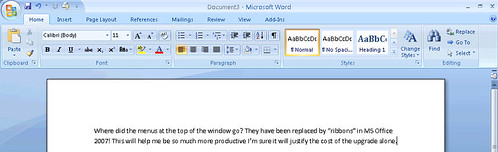
One of the first features I notice that is different about Office 2007 is that there are no more drop down menus on a menu bar at the top of the screen: instead everything is available as “ribbons.” Ribbons are like toolbar buttons, except some of them work when you mouse-over them instead of having to actually click them.
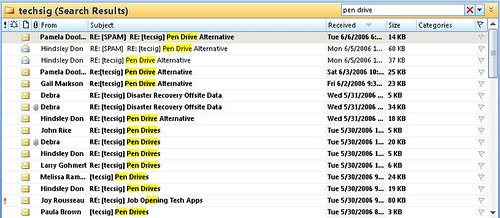
Perhaps the most needed and welcome feature in Office 2007 from my perspective is the search feature in the updated version of Outlook. One of the handy things about Mac OS X is “Spotlight,” a technology that lets you quickly (as long as your computer is relatively fast) search not only document titles but also document contents for keywords. While not as powerful as Spotlight, Outlook 2007 does have a much-enhanced search feature. In this example, I have quickly searched a folder of email messages for the text “pen drive,” and it resulted in matches from both subject lines and message text:
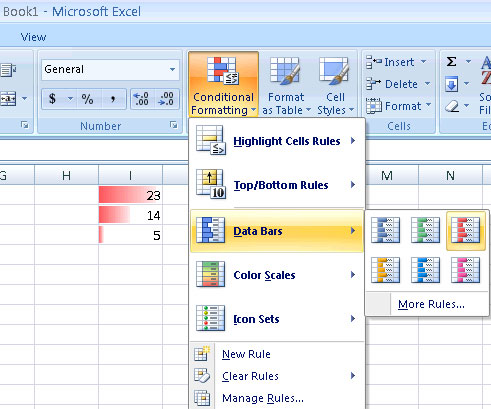
Another new feature that looks nice involves formatting in Excel with “data bars.” Choose the ribbon button “conditional formatting” after highlighting a range of cells, and choose a a color to display relatively scaled data bars within the spreadsheet cells:
One of the programs included as an optional download is MS Groove 2007, touted as a collaboration tool for geographically distributed workgroups. Microsoft (in typical Redmond style) purchased Groove and is now integrating it as part of their productivity suite. The Groove website describes Groove this way:
Everything your team needs to share files, manage meetings and projects, track data and processes, and get work down as if you were all in the same location. Your team stays in sync. Your information and conversations stay secure.
Sounds a lot like commercial web 2.0 with a proprietary Microsoft label and pricetag. I’ll probably pass on this one. The price isn’t right compared to the amazing dearth of free read/write web tools that appear to offer similar functionality. I suppose corporate folks more interested in protecting intellectual property and trade info would be interested in this…..
More info is available on the 2007 MS Office System preview site. Thanks to Shane Hammontree for sharing these tips!
If you enjoyed this post and found it useful, subscribe to Wes’ free newsletter. Check out Wes’ video tutorial library, “Playing with Media.” Information about more ways to learn with Dr. Wesley Fryer are available on wesfryer.com/after.
On this day..
- Meet MacBookMaestro.com – A Free Digital Badge Powered Learning Site – 2013
- Open Learning, Outside Learning, Leading Learning, & Building Learning – 2013
- Removing Red Eye with the iPhone App Photo Wizard – 2012
- Kansas Educators: Become a Storychaser this summer in Haysville, Greenbush or Andover! – 2011
- Steve Jobs at WWDC2011: The Truth is in the Cloud! – 2011
- Digital Citizenship video resources from Hoover, Alabama Schools and Common Sense Media – 2010
- Incredible tornado footage – 2009
- Pearson makes two big headlines – 2006
Comments
5 responses to “MS Office 2007 Beta and Groove”
Hmm… Makes me wonder about how the search feature will work on the Mac version of MS Office, which would obviously already have Spotlight available. Will MS simply incorporate Spotlight, or will they try to replace it or add on to it with something proprietary? Experience plus gut feeling says the latter.
However, I’m surprised at how much I like MS Office running on a Mac.
Well, MS has Entourage for email on the Mac side rather than Outlook, and spotlight already can search Entourage messages in the current version. I’m not sure what they are going to do for Mac Office. Reading the info about Mac Office on Microsoft’s website, it sounds like they will be a bit more delayed that their usual 2-3 year cycle getting out a new version that runs natively on Intel-based Macs:
http://www.microsoft.com/mac/default.aspx?pid=macIntelQA
I would expect to see a new version of Office for the Mac from Microsoft in 2008, but that is just my own wild guess. I continue to be very pleased with the file compatability between MS Office versions on Windows and Macintosh, that is really one of the most important things I think, and it is likely to continue into the future. I have not tried yet to open an Office 2007 document created in Windows on a Macintosh to see what happens, I’ll have to do some testing on that in upcoming weeks.
[…] [Update: I just noticed that Wes Fryer over at speedofcreativity.org has a nice writeup of his experiences with the Beta version.] Add to Linkademic Digg This […]
I wonder if we will see schools rushing to upgrade? I know my previous school rushed to upgrade to office XP when it came out, not sure why, the kids didn’t seem to get anything out of it. hmm make me wonder what the future of office suites will be in schools? Will there be a need for office?
I think there will definitely be a need for productivity software, or what Elliot Soloway calls “clerical applications”, but I think schools now licensing MS Office could save themselves thousands if they went with a free, viable option like OpenOffice. That type of thinking is pretty counter-cultural for IT and school tech depts, however. Maybe that will change…..