
I purchased the latest update to the Macintosh operating system (“Leopard”) at our local Apple Store in Oklahoma City on Saturday, and my initial impressions are very positive. I initially tried an “upgrade” installation on my Macbook, but the computer would not complete the boot-up process for some reason after that installation. I tried it again and repaired disk permissions as well as the hard drive itself using the disk utility that comes on the installation DVD, but nothing helped. Finally, I opted for an “archive and install” option, and that worked flawlessly without a hitch. When upgrading any computer’s operating system, it is generally preferable to NOT upgrade the existing OS and instead install a “fresh” version. The “archive and install” option preserves user account and networking settings/files, but installs a new version of all system files. In the long run, I’m glad I had to go with this option, since it tends to be more stable and less prone to problems/issues.
I did end up doing some “housecleaning” to various files on my hard drive which I’ve needed to back up and delete for some time. The general rule for hard drives is to keep at last 10% free so you have plenty of “swap disk” space, and I had been getting below that level. Now I have over 20% of my hard drive free and a new installation of Leopard… Things are speedy and overall REALLY good.
The main downside I’ve seen so far is that my copy of PhotoShop 7.0 no longer works in Mac OS 10.5. That may be because of my “archive and install” procedure– I have not reinstalled from the original CD yet. I’m wondering if that version is just not compatible with this latest OS revision, however.
All my other programs are working great in Leopard. I did update my Skype to the latest version, but nothing else has needed an update so far from what I can tell. The OS does seem snappier, and I like many of the changes to the Finder and file management interface.
The best thing about Leopard which will have an impact on our family, from what I can tell so far, is the enhanced “parental controls” which are available. Previously, website content filtering was limited to only “whitelisting” approved websites (in the Safari web browser only.) If a child (or other person) used another web browser, like Firefox, web content was NOT filtered by the operating system. Having three children under age 10 who are frequently getting online, including one who is ALMOST 10, the issue of content filtering is one we’ve been discussing more. As you may recall from my last post on the issue of content filtering, I AM in favor of limited content filtering, both at home and at school. I think many public schools are now OVER filtering the web, however, and the pendulum of censorship in schools needs to swing in the other direction… As schools implement individual accountability regimes for online activities, similar to what this latest revision of the Macintosh operating system permits.
Up to this point, at home our kids almost always go to pre-saved websites when they are online. Our oldest child is starting to do more web searches for homework assignments, however, and I see that behavior as a key differentiator which requires that his Internet access “graduate” beyond the simple whitelisting system we’ve been using previously. We are going to purchase and activate a home subscription to NetTrekker soon, which will address many of our concerns, but I think the enhanced parental control options of Mac OS 10.5 are also going to be very useful. I’ll detail a few of these and why I think they are outstanding.
The website logging is a GREAT feature:
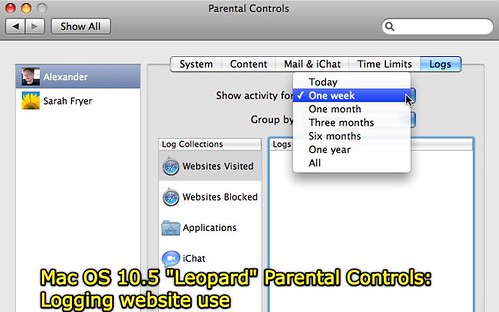
It does not appear that even a computer administrator can readily delete anything in the website log for an individual user. The “delete” option is not available when you view a website log. An administrator can choose to visit or allow a website, but not delete it from the log. This makes sense. Everyone using the computer (on a non-administrator account) needs to understand that ALL their web activities are being documented and logged.
In addition to logging website accesses (something I think school networks should be doing also, btw) Leopard now permits two different levels of website content filtering. It also permits profanity to be excluded from the dictionary, which is nice:
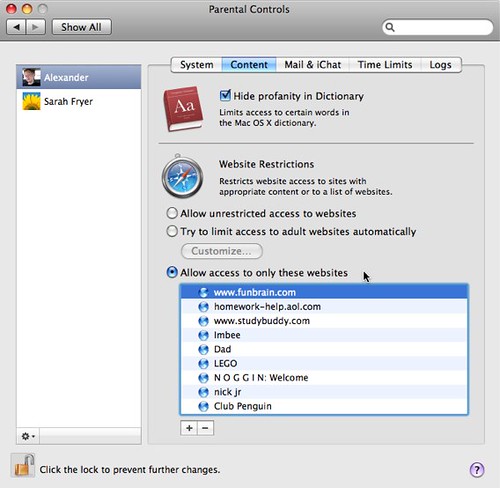
The second option, which is the one we have been using for our two youngest children up to this point, is “whitelisting” approved websites. The new choice is labeled “Try to limit access to adult websites automatically.” That language was very carefully selected, I’m sure, since it is virtually impossible to GUARANTEE that all adult or potentially inappropriate websites are going to be blocked unless sites are strictly whitelisted. If a person is going to do any type of Internet searching, however, whitelisting is overly constraining.
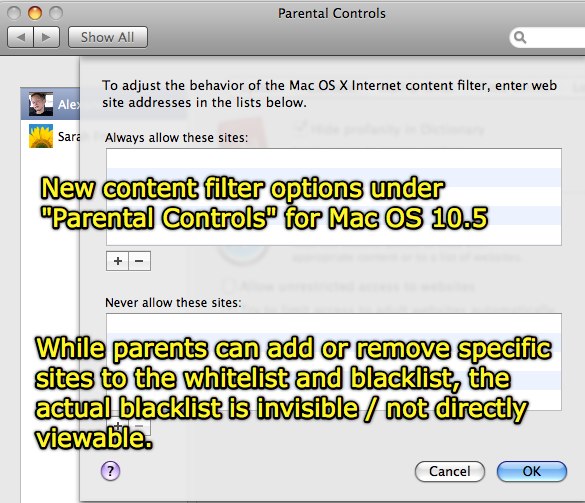
This new content filtering option lets parents specify websites to ALWAYS allow as well as websites to NOT allow. However, it does NOT (as I initially thought it might) require that parents (or other computer administrators) pre-populate the lists of sites to block or allow. Rather, this blacklist is hidden and apparently being managed by Apple. I’m sure this will be something others will look into in weeks ahead– whether that blacklist is stored locally or remotely. I’d guess a local copy is being stored somewhere locally because of access speed issues, but if so it’s not clear where.
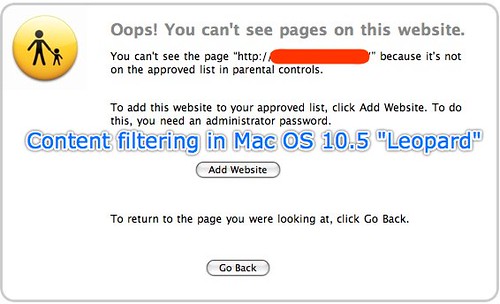
The entire purchase price of the Leopard operating system update is justified, in my view, by these enhanced parental control options. I’ve explored some of the other features of Leopard and do like them (especially the green screen-like enhancements to iChat and PhotoBooth) but the parental control updates are the ones that will most immediately affect our family. When my son has been searching the web for content previously, I’ve had three options: Individually authorize/permit each different website he wanted to visit by entering my own userid/password (not workable when doing a lot of Internet searching,) letting him surf on my administrator (non-content filtered) account (also not a great idea) or changing his account to permit unrestricted web access. None of these options were good.
Thanks, Apple OS developers, for providing a “fourth path” for him to surf the Internet with an increased level of confidence that he won’t encounter something objectionable or offensive. As I stated previously, a Nettrekker Home subscription will also address this, but I’m VERY glad to have the additional option of filtered Internet access on a child’s account which is not using “whitelisting” for content filtering. I’m also delighted this content filtering works for all web browsers now, not just Safari as it did in the past. Now, perhaps, I won’t have to worry about going to the trouble of installing IPCop on a Linux computer on our home network and configuring all Internet traffic to go through it as a gateway and content filter. I’m sure I would have learned a great deal setting that up, but I am VERY happy to avoid all those headaches by simply upgrading to Leopard! 🙂
Technorati Tags:
apple, leopard, operatingsystem, contentfiltering, filtering, internetsafety, children, parents
Note: As of 1 Oct 2026, this is a FULL STATIC COPY of all 6,390 posts shared on this blog since 2003. Updated content and ideas from Wes Fryer are still available!
Comments
8 responses to “New Parental Control Options in Mac OS 10.5 Leopard”
Thanks for your review. I have just ordered my new Mac Book Pro and was wondering what people thought of it- beyond the Apple hype.
Wes, do your children use netTrekker at school? If so, they can log on at home or even create their own netTrekker ID. Contact me if you need help with this.
Danielle: Unfortunately no, our school district in Texas DID subscribe to NetTrekker for elementary schools and we had the userid and password for the school, but our Oklahoma district and school doesn’t. We’ve gone ahead and paid for a yearly NetTrekker Home subscription. The kids started using it this evening and were very enthused. We’ll be reporting on our usage of it in upcoming weeks I’m sure! Also, it would be good to do the podcast we discussed at NECC at some point, perhaps later in November.
Thanks for the review of content filtering. We have a 15 year old son and have been using SafeEyes at his request. We’d taken it off – but he asked for it back on because of all the temptations of the net. I don’t want to be overly restrictive, afterall he’ll soon be on his own. But… it sounds like the Apple solution might be a nice in between. He was being blocked from YouTube and other teen favorites with SafeEyes. I know what can be on YouTube – but I it’s a good place to practice discernment. Do you know if Apple’s filtering allows access to YouTube? Have you tested some “adult” sites and did it work? Thanks for going so in depth!!!
Yes Chris, you can individually “whitelist” websites like YouTube if you want and cause the Leopard content filter to always permit access to those websites. I did test a couple “objectionable” sites on one of the kids’ accounts and indeed it blocked access to them! It also logged the websites and didn’t permit deletion– so I am really pleased with this solution. Combined with using Nettrekker Home (to which we’ve now subscribed) we feel really good about our 9 year old searching the web and using it. We’re still keeping the computers (laptops) in the living room area and not taking them back to bedrooms… I am not concerned at this point about him sneaking off to access websites he shouldn’t, but I think it is a good habit and routine to establish now. I think it’s interesting your son asked for the filtering software again– I think that shows some real “digital discipline.” Those types of issues are BIG for many, many people in my perception, not just a few– and adults as well as young people. So kudos to your son. You are most welcome for the review! I’ve had a chance to now experiment with the networking features of OS 10.5 as well as the iChat enhancements (iChat theater) and I am REALLY pleased overall. The only bug that seems to need fixing is the flash player problem, where I can’t upload images to VoiceThread…
We just installed Leopard, which we bought, like you, for the parental controls. However, web access, which without controls blazes along at broadband speeds, is now unbelievably slow, to the point of not being usable. Not sure if we’ve done something wrong, but until we figure out, we are, reluctantly, turning the controls off. Why isn’t there NetNanny for the Mac?
I love the concept of the parental controls. But I’m having a nightmare with them. We upgraded our homeschool co-op, 15 computers in all. And now java is broken in Firefox, CSS rendering is broken in Safari on some sites that draw content from multiple servers, outgoing mail servers can no longer be found, and lots of school-necessary websites cannot be accessed.
We really want to use the parental controls, but unless someone can give me pointers on how to make it work, our academic process has been hamstrung by this thing.
Argh!