
This afternoon and evening I spent about three hours with my 9 year old son, and about 4 hours on my own, exploring and creating with the new features of Google Maps. I was inspired to do so by David Jakes, who gave a WONDERFUL presentation on Friday at TechForum in Austin about both Google Earth and Google Maps.
This afternoon Alexander and I were working on a digital alternative to a 4th grade salt map assignment about the landforms of the United States, which I wrote about last week on our family learning blog. While I wish this was actually an alternative, in fact it is a “supplementary” activity because I never got around to asking his teacher if he could do something with Google Earth (I didn’t know about the “create-your-own” options of Google Maps) last week INSTEAD of a salt map. So, he and his mom are going to go ahead and create the salt map tomorrow I guess… but what he created on his own in Google Maps and using VoiceThread this afternoon and evening is REALLY great. When he gets finished with the entire project, I’ll help him embed the map in a post on our family learning blog and I’ll cross-link to that here. I’m sure we’ll post some comparative photos of his traditionally-done salt map as well. I’ll see if he’s willing to be interviewed on a comparison of the learning outcomes of each activity. He rolls his eyes now when I ask to interview him for a podcast, so we’ll have to see… I’m not going to force him to be recorded for an interview if he doesn’t want to do it.
After he went to bed, I played some more with Google Maps and created this “Multimedia Travelog” which links many of the image sets I’ve posted to Flickr from around the United States in the past year, and a few from other parts of the world.
I am REALLY enthused about the ability to easily paste embed code into the description of a placemarker in Google Maps. The one thing I cannot figure out, however, is why I cannot get pasted embed code from VoiceThread or even YouTube to work. I tried this both on my Intel-based Macbook and on a HP laptop running WinXP and Firefox. No dice in either case. The Google Earth Outreach blog gives instructions for embedding a YouTube video into Google Maps, but these steps aren’t working for me. I have no idea why. At least it’s working to embed Flickr images, and I’m able to make links to other pages.
Alexander created one VoiceThread for “The American Plains” this afternoon and linked it on his own Google Map. I’ll probably help him create at least three more tomorrow as well. He’s using all Flickr Creative Commons images and even linked each image in VoiceThread back to the original website for proper attribution. The main obstacle to him being able to do the project 100% by himself is the fact that apparently there is still a Flash issue with Mac OS 10.5 Leopard which prevents uploading of images directly into VoiceThread. We were able to work around that today by uploading the images (with private permissions) to a new Flickr set, and then importing the images from Flickr into VoiceThread.
The geographic connections which Alexander is making as he works on this project are terrific. As an example, tonight he showed me the Hudson Bay and said, “Dad, that must be SO big. Look at how large it is compared to the Gulf of Mexico!” He was moving around inside Google Maps and showing me both bodies of water. That kind of comparison and discovery is EXACTLY the sort of learning we need students to do with geographic ideas and topics. Google Earth and Google Maps provide WONDERFUL tools for this type of learning, but of course each learner needs to have access to his/her own computer to do this type of work.
I’m thinking at some point we are going to have to move our family into a school district somewhere, probably in Oklahoma, Texas, or Kansas, that is implementing a 1:1 laptop initiative (with Macintosh portables, of course) with middle and high school students. The only district I know of in Oklahoma doing this now (with laptops of any ilk) is Howe Public Schools. I know in Kansas they have between 20 and 30 schools around the state implementing laptop initiatives. I am really mystified why we don’t have a similar number of districts here in Oklahoma doing the same. I love where we live, but it is starkly apparent to me that the potential learning of my own children is VERY limited by the fact that they don’t have individual access to laptops at school. Having that access at home is great, but I don’t want my own kids to have to go back to “all pencils and paper” when they leave our house and return to school. Currently, that’s our situation.
I think we will try and record a screencast of Alexander presenting his “landforms project” and send that to school as a Windows Media File saved to a CD. That way he’ll be able to share it without bandwidth or website access issues at school if he’s able to. I’ll post a link to his finished project and screencast here when he’s done, which will hopefully be later tomorrow afternoon.
I’m having so much fun doing this project with him! Our kids are still attending public schools, but we are also certainly “home schooling” with additional learning activities like these. We are fortunate to have access to the computer hardware, Internet connectivity, and knowledge resources (thanks David Jakes) to create these sorts of digital opportunities for learning.
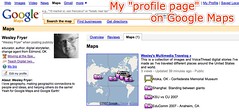
Like Google Notebook, I like how Google Maps now allows users to create a “profile page” which automatically links to all your publicly shared maps. Very cool and useful!
Technorati Tags:
googlemaps, googleearth, geography, saltmap, education, school, landform, report
If you enjoyed this post and found it useful, subscribe to Wes’ free newsletter. Check out Wes’ video tutorial library, “Playing with Media.” Information about more ways to learn with Dr. Wesley Fryer are available on wesfryer.com/after.
On this day..
- A Teachable Copyright Moment from Erik Qualman – 2011
- Alan November’s Opening Comments: Innovative Learning Institute 2010 – 2010
- Authenticity in Math: Connecting to the Real World – 2010
- A new day dawns for the U.S. Presidency and Electorate – 2008
- Voting in Oklahoma 2008 – 2008
- Why is voting cool now? – 2008
- K12Online06 feeds and agenda complete – 2006
- Good Thoughts on Wikis – 2005
- WPA Wireless Security – 2005
Comments
7 responses to “Creating geographic information connections with Google Maps”
Hi Wesley
Seeing as you posted this I thought I might add a question here and you or your readers might be able to help me. I have started a project called Run to Meet You at
http://runtomeetyou.wikispaces.com/
we have tried a few different Google maps sites but the most useful one so far that I have found is
http://www.wayfaring.com/maps/show/44311
Unfortunately for me it doesn’t have the option of showing the distance in km.
I found
http://www.webwalking.com/
but it doesn’t let us save the route. What I’d really love is one where I can mark a route in km and add to the route over time as well as adding notes and photos to the map.
If anyone can point me in the right direction I’d be most appreciative.
Cheers
Paul Wilkinson
paulwilkinson1@gmail.com
I’ve known about Google maps for a bit but am always interested
to see the twists other people put on it. The Shanghai picture
was striking. When you then look at the map the shadows have
even more impact. Loved the Vancouver photos and glad you got to
visit Stanley Park before the big wind storm we had last fall.
You would see a very different park today with hundreds of
trees missing. I wonder how often Google updates their maps.
I think you’d see a vast difference if you compared a google map
of the park from two years ago to today? This would be a great
way to study impact.
Embedding and also the easy movement between Google Earth and Google Maps is a huge development. I created a similar travelouge of my youtube videos.
http://ideasandthoughts.org/2007/09/06/video-adventures-in-google-earth/
Easily done. Placed based learning should really take off as a result of these improvements.
Great Post and I now have some work to do with google maps. I haven’t done the profile page but will get it that after some football and some mandatory school work.
We are using google earth as a presentation tool in World History. Its much more fun to make google earth placemarks than ppt slides and they tend to do a better job of using images and then actually speaking instead of reading text intensive slides. This week we used google earth as a backdrop for their googlepage assignment on african Kingdoms. We created a tour in google earth with the placeholder giving the link to the googlepages and the questions they needed to answer. They took the tour and looked for answers at their seats.
We have also used click2map.com and mapwing.com to do cool map things.
A final app that might interest you is http://www.flashearth.com/
Thanks for those links, Elizabeth, I hadn’t seen flashearth.com or mapwing. I definitely agree that creating interactive maps can be much more engaging than just creating PowerPoint presentations! When your students finish their tours please send me the link to one or more of their KML files and I’ll check them out! 🙂
I am liking the Picasa Photo pages too. You can mark the geographic location of the photos taken and they will publish to the Picasa Web Albums on Google Maps.
Wes: thanks for your kind comments about my presentation. At this time, GM does not support embed codes from the sites I demonstrated, only GE does that. Additionally, the help pages at Maps says you can embed video, but there seems to be a bug in the code. Others have said the same thing in discussion boards. I see GM as an initial design environment for teachers, and then having them transition into design in Earth for more specialized projects. I also think that it is only a matter of time before Maps adds this kind of capability.