
These are my notes from Dr. Leigh E. Zeitz’s ISTE webinar on Dec 3, 2008, titled “Dr. Z’s Creative Cookbook for Collaborative Communication.” MY THOUGHTS AND REFLECTIONS ARE IN ALL CAPS. This webinar was shared using Adobe Connect. Dr. Z teaches at the University of Northern Iowa.
Dr Z’s blog: www.leighzeitz.com
Twitter: @zeitz
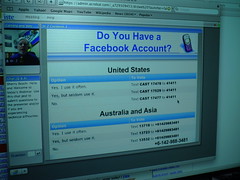
Dr. Z kicked off the webinar by sharing a PollEverywhere quiz about who has a Facebook account and uses it regularly.
Tim Berners Lee’s graphical representation of the web’s connections
– comparing 1993 to 1996
– 250,000 sties to 45 million global users
Web 2.0
– 80 million sites
– 1 billion global users
– web 2.0 is about building interaction
August of 2008
– now we have 1.5 billion users online using web 2.0 (6.5 billion on the planet)
I DON’T THINK IT’S TRUE YOU CAN SAY 1.5 BILLION PEOPLE ARE USING WEB 2.0 TECHNOLOGIES. THAT MANY PEOPLE MAY BE ONLINE, BUT LOTS OF FOLKS ARE STILL LIVING IN A WEB 1.0 WORLD AS FAR AS THEIR OWN USE, WHICH IS (IN MANY CASES) LARGELY LIMITED TO WEB SURFING TO CONSUME INFORMATION AND EMAIL.
Dr. Z’s Creative Cookbook for Collaborative Communication wiki page
HE JUST DONNED A CHEF’S HAT
Differences between cooperation and collaboration
– cooperation is when everyone is doing the same thing, we are using everyone’s work
– example: everyone is working on the same task together
collaborating is using our own strengths and gifts, like when people build a house together and are doing different things while working toward the same, larger goal
Collaborative tools?
– multiple user access
– same/different time editing
– revision tracking
– collaborative communication
– update notification
Collaborative web tools
– wikispaces
– blogger
– wikipedia
– skype
– twitter
– ning
– jing
– poll everywhere
Dr Z’s wiki: http://activeweb20.wikispaces.com/DrZ_Cookbook
– he used a tinyurl address to get people here
This is basically a website with an edit button
DR. Z IS NOW PLAYING THE VIDEO “GOOGLE DOCS IN PLAIN ENGLISH.” THIS LOOKS GREAT OVER ADOBE ACROBAT CONNECT!
Now he is demoing Google Docs
Now showing Jing
Now showing Twitter
Now showing Classroom 2.0
THIS IS A VERY “TOOLY” PRESENTATION: AWARENESS LEVEL SESSIONS ABOUT WEB 2.0 TOOLS. THIS IS OK, BUT PERSONALLY I THINK PRESENTATIONS WHICH ACTUALLY SHOW EXAMPLES OF STUDENT PROJECTS USING WEB 2.0 TOOLS ARE MUCH MORE POTENTIALLY INSPIRING AND HELPFUL. THIS SORT OF PRESENTATION ALWAYS REMINDS ME OF JAMIE MCKENZIE’S SEPTEMBER 2001 FNO ARTICLE, “TOOLISHNESS IS FOOLISHNESS.”
Remember:
– Live with courage
– Teach with Vision
“The most important thing is having fun.”
2 COMMENTS / QUESTIONS I POSTED IN THE ADBOBE CONNECT SESSION: (WE POSTED AS @ittosde)
– WHAT WE NEED YOU TO DO IS LEAD AN OPENLY LICENSED (CC) PROJECT WHERE LEARNERS UPLOAD AND SHARE THEIR TUTORIAL SCREENCASTS, SORT OF LIKE AN OPEN SOURCE ATOMIC LEARNING
– WHAT DIRECTORY DO YOU RECOMMEND TEACHERS USE TO FIND SKYPE-USING EXPERTS TO BRING INTO THEIR CLASSROOMS?
DR. Z DID NOT ANSWER/RESPOND TO THE FIRST COMMENT/SUGGESTION, AND SAID HE DIDN’T HAVE AN ANSWER FOR QUESTION #2. I WAS DISAPPOINTED HE DIDN’T HAVE A PRACTICAL ANSWER FOR THIS QUESTION BESIDES “IF YOU HAVE AN ANSWER, PUT IT ON MY WIKI.” THIS IS SOMETHING RODD LUCIER BLOGGED ABOUT MONDAY AND AGAIN TODAY.
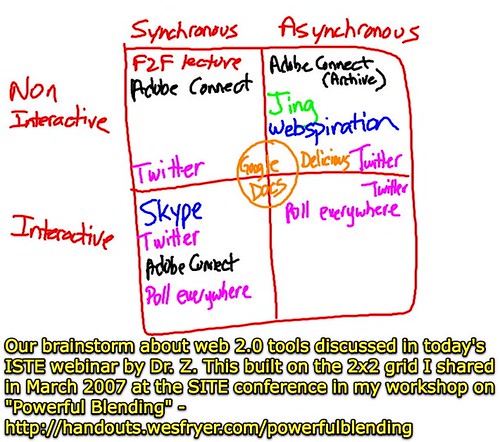
FOLLOWING THE PRESENTATION, I HAD A POST WEBINAR DISCUSSION WITH JOHN COSTILLA AND ERIC HILEMAN. WE USED A PROMETHEAN ELECTRONIC WHITEBOARD TO CATEGORIZE THE WEB 2.0 TOOLS DR. Z ADDRESSED, USING A 2 X 2 MATRIX WHICH I CAME UP WITH IN FEBRUARY 2007 PRIOR TO MY WORKSHOP “POWERFUL BLENDING: USING WEB 2.0 TO INTERACT, CREATE, AND ASSESS” FOR THE SITE CONFERENCE.
THIS WAS THE ORIGINAL 2 X 2 MATRIX FROM FEB 2007:
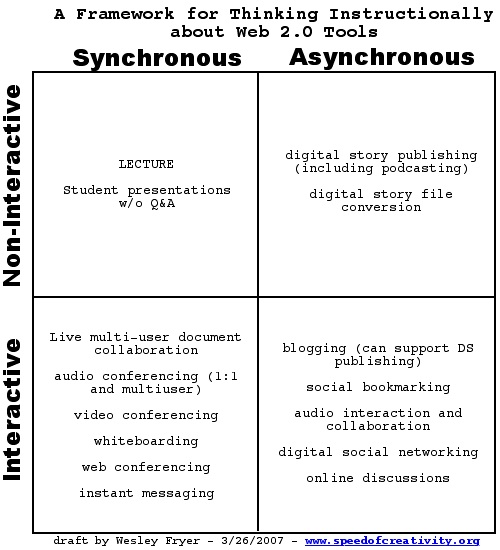
BASICALLY, THIS ACTIVITY INVOLVES ANSWERING THE FOLLOWING TWO QUESTIONS ABOUT A WEB 2.0 TOOL OR TECHNOLOGY:
1- DOES THE TOOL OR ENVIRONMENT PRIMARILY SUPPORT INTERACTIVE OR NON-INTERACTIVE LEARNING?
2- DOES THE TOOL OR ENVIRONMENT PRIMARILY SUPPORT SYNCHRONOUS OR ASYNCHRONOUS LEARNING?
[THE REST OF THIS POST INCLUDES MY OWN REFLECTIONS, BUT I AM GOING TO STOP TYPING IN ALL CAPS BECAUSE IT FEELS LIKE I AM YELLING. 🙂 ]
I defined these terms in my 11 January 2006 post, “Synchronous non-interactive?”
Synchronous: It’s “live.” The teacher and students are online together at the same time.
Asynchronous: It’s NOT “live.” The teacher and students are generally online at different times.
Interactive: Students ask questions and INTERACT with the teacher and often each other.
Non-interactive: The teacher is just lecturing / presenting content, students don’t have a chance to interact or ask questions
I also addressed this in my 18 January 2006 post, “The Synchronous Non-interactive Fallacy.” One of the key points from those posts is this: When an instructor is sharing lecture content and not permitting students to ask questions of any kind, that format of lesson delivery (synchronous, non-interactive) should be replaced by at worst an “asynchronous, non-interactive” format or even better, an “asynchronous, interactive” format. The following news report video, “Educational Podcasting in Woodland Park, Colorado,” is essentially an example of television reporters starting to experience this pedagogical epiphany:
Nod to Eric Hileman and his delicious social bookmarks for this link!
This situation brings to the forefront a VERY important question: How are students going to be able to access these videos of teacher lectures? How will the digital divide be bridged? What type of device will and should the school provide for students to access and watch asynchronous videos at home? Evidently in Woodland Park they are burning DVDs for many of the students to watch videos at home who don’t have a computer to access web-based versions. Long term and on a broad scale, that is not a great solution.
The correct answer, in my view, is providing EVERY student with a laptop computer which permits them to not only passively CONSUME content, but also take an active role in their learning as prosumers: creating, communicating, and collaborating. This is the case for 1:1 computing.
In Oklahoma, we need to follow the lead of school leaders like those Birmingham, Alabama. Bring on the laptops — But don’t stop there. We do NOT simply need to drop laptops on top of a 19th century model of education. Authentic learning is far more than filling a pail. Constructivist educators know and understand the vital role of active learning and knowledge reconstruction, as students connect new knowledge and ideas to their past experiences and schema.
Overall, this ISTE webinar from Dr Z. was OK, but I found its utility limited since it was essentially an “awareness” level presentation about a variety of web 2.0 tools. In a way, it’s easy to share presentations like this. Dr. Curtis Bonk’s keynote at SITE 2007 was similar in that he mainly seemed to draw attention to a variety of tools, but didn’t show in-depth examples of how these tools ARE being used in instructional lessons. Similar to Dr. Bonk, today Dr. Z made some oblique references to how these tools could be used instructionally (like enthusiastically suggesting, “Use skype to bring a guest speaker into your classroom” but when asked a specific, practical question like “What website or online database do you suggest K-12 teachers use to find guest speakers” he didn’t have an answer. (Some of mine are listed on “Videoconferencing Collaborations and Virtual Field Trips.” Brian Crosby’s K12Online08 presentation “Video-Conferencing It’s Easy, Free and Powerful” also has good suggestions. Best idea: Use a learning community like Classroom 2.0 to make connections with other teachers.)
Personally, I think it is very important to consider the wide range of teacher attitudes and dispositions when it comes to technology integration in the classroom, which tend to reflect Everett Roger‘s diffusion of innovations curve shared on the Technology adoption lifecycle WikiPedia article.

Most classroom teachers, in my view, are NOT going to get excited about Twitter. Social bookmarking with a tool like delicious, however, is a website resource and tool which EVERYONE actually needs and can use on a regular basis. I think if you are going to share an awareness / introductory session about web 2.0 tools with educators, it can be more helpful to focus on tools which can be considered “basic ingredients” for blended learning. (That’s the approach I’ve tried to take with presentations like “Powerful Ingredients for Digitally Interactive Learning.”) I think it’s also helpful to share and discuss categories of tools and a framework for understanding their appropriate contexts for use, as we did today at the Oklahoma State Department of Education following this webinar. I would have been interested to see the results of a poll Dr. Z could have done at the start of his webinar: How many of the people in the virtual audience already had an awareness-level understanding of the web 2.0 tools he discussed? I’m not sure of course, and that’s why a survey like that might have been helpful. I’d guess that many people were familiar with the tools– and did NOT need, for instance, an introductory tour of Google Docs.
There were a few tools on Dr. Z’s wiki which I had not encountered previously, however, and I’m looking forward to exploring them soon in greater depth. These included MyWebspiration, a web-based version of Inspiration concept mapping software (currently in free beta,) and CiteLine, “a service to facilitate the web publishing of bibliographies and citation collections as interactive exhibits and facilitate the sharing of this type of data.” CiteLine was linked from the MIT “Semantic Interoperability of Metadata and Information in unLike Environments” site, which Dr. Z has listed on his wiki as “Exhibit With Timeline.” This is the example Dr. Z has linked, and it is AMAZING. XTimeLine is the only other web 2.0 timelining tool I’ve seen to date, and I think these sorts of tools have LOTS of applications. The MIT Timeline application website is still available, but it has now become part of the Google Code MIT Smile Widgets project as “Timeline.” VERY COOL. I’m glad to have found these resource links from Dr. Z’s wiki! 🙂
I’m looking forward to more learning this year in the 2008-2009 ISTE Webinar series. I’m sorry I missed Bernajean Porter‘s presentation on digital storytelling from Oct 1st. It is for sale for $50 for ISTE members or $125 for ISTE non-members online. I don’t think I’ll be buying that on my own, however, for my personal PD menu. Instead I will soon be watching Mathew Needleman’s FREE K12Online08 presentation “Film School For Video Podcasters.”
The availability of free, high-quality professional development materials and curriculum (including video presentations) presents unique challenges for content providers who want to monetize their programming. That said, there certainly is value and amplification power (to use the metaphor of “technology as amplifier” I learned from Jeff Allen a few years ago) in a webinar series like this from ISTE. Liz Kolb’s presentation is coming up December 16th! If you want a FREE preview, check out her K12Online07 presentation, “Cell Phones as Classroom Learning Tools.” I’m hoping we’ll hear about new tools for cell phones from Liz in a couple of weeks!
Technorati Tags:
iste, webinar, web2, education, technology
If you enjoyed this post and found it useful, subscribe to Wes’ free newsletter. Check out Wes’ video tutorial library, “Playing with Media.” Information about more ways to learn with Dr. Wesley Fryer are available on wesfryer.com/after.
On this day..
- Mapping Media to the Common Core with iPads (Dec 2013) – 2013
- Seeking Adventure in the Wide World (Puppet Pals video) – 2011
- 99¢ Podcast: Creating Multimedia eBooks – 2011
- Be Kind, Do Your Best, and Become a Voracious Reader – 2010
- Maps and initial Hawaii photos – 2007
- Update on Hawaii webcasts and videoconferences – 2007
- In-Flight Entertainment 2.0 and Educator Professional Development – 2007
- Tips for home high speed Internet connections – 2006
- iPod101 – 2005
Comments
7 responses to “Notes and Reflections on Dr. Z’s ISTE Webinar today, blended learning, and web 2.0”
Wesley,
I am honored to know that you were among the audience for our webinar on Wednesday. I have long been a fan of your work and enjoyed many hours of listening to your podcasts.
Yes, this was an overview of many of the opportunities that are available in the Web 2.0 world. This presentation was tool-oriented but I envisioned this as a way get teachers thinking about what they might be able to do with collaborative tools.
Future presentations will include case-based discussions about how to integrate these tools into subject specific applications in the classroom.
Concerning your questions:
– I thought that I did respond to your first question by saying that I thought that your idea of an open-source screencast library would be a good idea. Perhaps I should have reflected on it more.
– I have been thinking about your second question. While most of the people that I know use Skype to bring professional colleagues into their classrooms, I don’t know of any specific directories for people interested in doing this. It suddenly dawned on me that the NECC conference (or any conference) program is a perfect directory of people who might be interested in Skyping into your classroom. They don’t need to be Skype-using people either. I have had to teach a few of the experts I wanted to bring into my classroom how to use Skype. The interesting thing is that once they get the taste of Skype, it becomes an integral part of their daily lives.
I liked your 2×2 matrix of the tools that I presented. I seem to remember you discussing this in one of your podcasts. May I refer to it in future presentations? It is interesting that you placed Webspiration in the Asynchronous/Non-interactive sector. I assume that the reason that you placed it there was because only one person can edit the map at a time. While this is not an optimal method for interaction, does it mean that it is Asynchronous? If multiple people are looking at the same screen but cannot edit it at the same time, does that mean that it is asynchronous?
Is it possible to have an asynchronous editing power in a synchronous thinking session? Hm . . . interesting.
Wesley, I appreciate your work in synthesizing and expanding upon this presentation. Your ideas about using interactive media to enhance the 1:1 laptop experience is quite true. The laptops are just windows into the world of available resources around the world and we must optimize this opportunity for students.
I hope that we can keep in touch,
Leigh Zeitz – Dr. Z
Hi Wes,
I appreciate the mention of my own presentation and look forward to your comments on Film School for Video Podcasters.
One more site specifically for finding people to video conference with is this: http://projects.twice.cc/
Dr Z:
Since this was my first time to see Webspiration our group may have placed it in the wrong quadrant– it sounds like it should go in Asynchronous/interactive as well.
In terms of professional directories for expert guest speakers, I know that MERLOT has a virtual speaker’s bureau but I think it’s geared more for higher education. This is something Rodd Lucier was asking about on Monday. I think you are right, NECC and other conferences provide great opportunities to grow and expand personal learning networks, particularly when they (as NECC did in 2008) create Ning networks or other learning communities for educators to interact and connect.
I think your idea of doing case-based discussions about how these tools can be and are being integrated into classroom lessons sounds wonderful. I think short case studies like that could provide great material for continuing PD in schools. We discussed this yesterday after the webinar: How beneficial it is to help educators experience blended learning. That can involve watching a video and then discussing it, or a live webinar like we did yesterday and then discussing it. It is certainly more powerful to experience that form of learning personally rather than just talk about it. Yesterday’s webinar was very beneficial in that respect, and I think it is a good idea for district professional development leaders to strategize about how more teachers in their schools can experience similar blended PD opportunities.
I certainly agree it is a great idea to help teachers gain personal experiences about the benefits of videoconferencing using tools like Skype. I am a strong advocate of videoconferencing with grandchildren! While I understand we want teachers to get to the curriculum integration stage and ideally an ACOT invention stage, we all take baby steps… and making personal connections with our family members is a great way to start walking down that road toward transparent technology integration, where technology is used like a pencil in the learning process to accomplish learning tasks. For those who understand desktop videoconferencing tools like Skype and iChat, however, this absence of a virtual speaker’s bureau for K-12 is a real need. Perhaps this is something you can suggest to ISTE they start and sponsor? I strongly think this needs to be a tool that is open for anyone to use, however, regardless of whether they are an ISTE member or not. ISTE’s advocacy for a resource like this could have tremendous impact on the practical potential for educators to utilize guest speakers. The CILC’s Collaboration Center and ePals certainly provide good venues for connecting with other educators and potential guest speakers, but none of these resources are explicitly for “virtual guest speakers” for K12 contexts.
Thank you very much for your session and ideas. Yours is the first webinar I’ve seen where PollEverywhere was used for a global audience survey– I thought that was GREAT. I look forward to continuing to follow your work!
Hey Wes,
Thanks for the notes on this presentation.. as usual, your commentary is great for putting the ideas into a practical context.
I’ve had some recent communications with the folks at TED about the potential for creating a Long Distance Guest Speaker directory for K-12 which would fit perfectly with Dave Eggers TED wish. I’m afraid, that I don’t have nearly as much clout as the folks I’ve been reading the past few years, and I’m wondering if you and perhaps some of your K-12 Online Conference collaborators might be able to push this idea forward?
As projectors become the norm in classrooms around the world, there is little doubt that teachers will be looking for meaningful and simple ways to put them to use. Such a directory would, I think, be a very popular online destination…
Wes,
As a season pass holder of the 2008-09 ISTE Webinar series, we have access to the complete archives. I will be hosting similar sessions like the one we held yesterday for archived sessions that look interesting. I’ll let you know when when the Digital Storytelling viewing is scheduled.
Best,
Eric
I definitely agree Rodd, that is exciting you visited with the TED folks about this idea. Having their backing for a project like that would be great.
Eric, that is super news! I’ll look forward to that viewing, and follow-up conversation! 🙂
[…] Digital curriculum has numerous advantages over analog/paper-based curriculum, but (as I noted in my reflections last week following Dr. Z’s webinar for ISTE) any educational initiative focused on digital curriculum faces the hardware digital divide: How […]