
I love creating and editing webpages on wikis. Having spent a fair bit of time in the past, web 1.0 world creating sites in Dreamweaver, Frontpage (yes, I know, it was painful but necessary) and an old favorite, Claris Homepage, I REALLY appreciate the ease-of-use and automatic navigational features of Google Sites as well as free content management solutions like Joomla. I’ve created most of my wiki pages in the past using PBwiki and WikiSpaces, but have also used WetPaint as well as the open source wiki environments MediaWiki and TikiWiki. Today I spent quite awhile making updates to our Celebrate Oklahoma Voices wiki site on Google Sites. This is the automatically generated sitemap for the entire site:
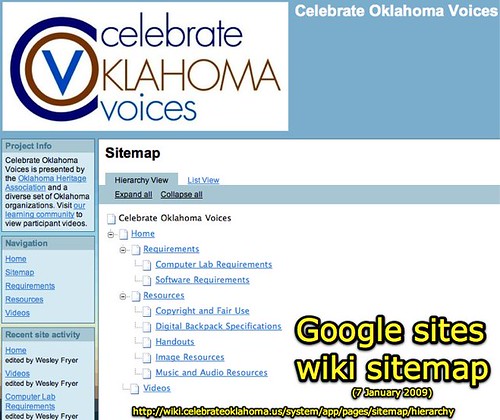
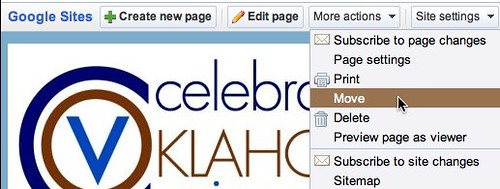
Today I reorganized the pages on our site so everything is a sub-page of the HOME page, or a sub-page of another page on the site. The reason for this is breadcrumb functionality: If all the pages are at the same “level” of the site (peers with the HOME page) then the built-in breadcrumb feature of Google Sites isn’t used. By making pages subpages of HOME (by using the “move” option under “more actions” at the top) breadcrumb navigational links are automatically created for the site. This is WONDERFUL to facilitate site navigation for visitors.
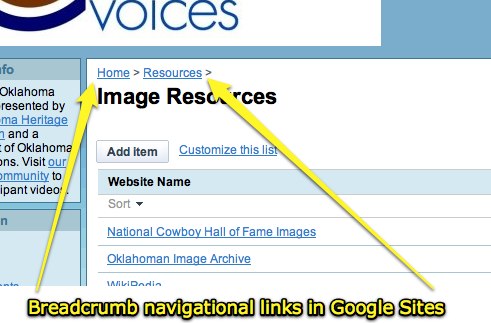
Besides automatic generation of a sitemap which shows parent-child relationships between pages and also creates navigational breadcrumb links at the top of each page, another great feature of Google sites is that custom web addresses can be used FREE. (This is a paid feature for sites like PBwiki and Wikispaces.) Under “site settings” and “other stuff,” site administrators can specify a custom subdomain address for the Google Site. Ours for the COV project is now wiki.celebrateoklahoma.us. That’s a much shorter address than the default, which still works too: sites.google.com/site/covsite.
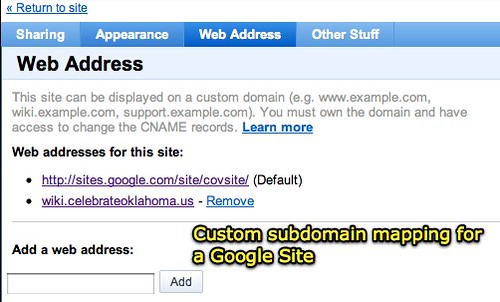
More information about configuring a custom subdomain for a Google site is available. This is done by making two changes: One to the CNAME DNS entries for your registered domain, and another in the admin settings for your Google Site as shown above. Back in September I posted about creating a custom subdomain for a Ning site as well as a PBwiki site. The trick for whitelisting a custom subdomain Ning site (like ours at lc.celebrateoklahoma.us) is also whitelisting http://api.ning.com. For more on this, see the COV learning community post (and memo) “Clarifications on our COV learning community (Ning) website” from November 11, 2008.
When you create a new page on a Google Site, you are presented with five different choices for the type of page you’ll make:
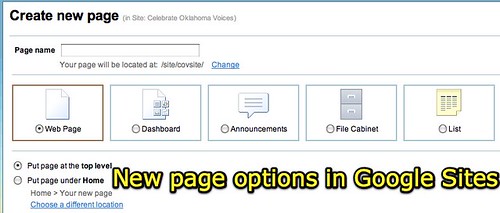
The “webpage” option lets you create a standard wiki webpage. The Google Sites Help Center explains the other page types:
A Dashboard page is a two column webpage with four placeholder gadgets to make it easy to get started creating an overview of information.
An Announcement page is a page which makes it easy for an individual or group to post chronological information like news, status updates, or notable events… Page subscribers are notified of new posts, and updates on existing posts. [THIS MAKES THE PAGE SIMILAR TO A BLOG.]
A File Cabinet allows you to manage documents from your hard drive and organize them into folders. This can be used to organize common documents in one place.
List pages allow you to easily track lists of information. You can choose from a list of templates or configure your own custom columns. Items can be easily added, updated, and removed.
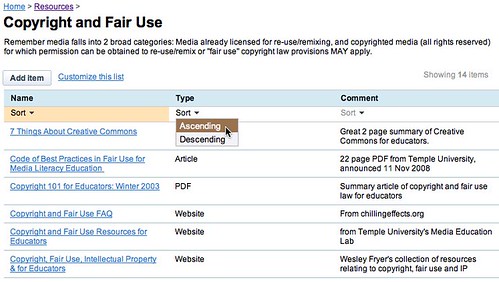
For the Celebrate Oklahoma Voices site on Google Sites, we are using a File Cabinet page for our Handouts, and List pages for image resources, music and audio resources, as well as copyright and fair use resources. List pages can be sorted by field, in either ascending or descending order.
The best way to get a feel for how Google Sites compares with other wiki environments is to use it for a project. The good news is, like other Google tools for Educators, it’s free! I’m finding Google Sites to be a powerful and useful environment for aggregating a lot of the content we’re using for our COV project in one place. I’m still keeping my personal workshop and presentation curriculum wiki on PBwiki, but I do have that mapped to a custom subdomain (handouts.wesfryer.com.) The main WetPaint wiki I’ve worked on was the project wiki about the USS Oklahoma and World War II that I helped facilitate back in the fall of 2007. The site I’ve used to experiment with MediaWiki is on StoryChasers, and my TikiWiki site is on a subdomain of my primary blog, with old dissertation ideas. It’s been valuable to experiment with these open source wiki engines, but at this point I’m sold on commercial (but ad-free for educators) wiki solutions like PBwiki and Google Sites.
If you haven’t already, give Google Sites a try. For those who have been using Google Sites already, what do you think? How do you compare the feature set of Google Sites to other wiki options?
For more links, resources and ideas related to using wikis in the classroom, see my presentation curriculum for “Get Wiki With It! Using Wikis for Collaboration and Learning.” An audio podcast recording of this session presented at the Oklahoma EncycloMedia conference last September is also available.
Technorati Tags:
wiki, google, sites, googlesites, pbwiki, wikispaces, wetpaint, mediawiki, tikiwiki, school, education, technology, learning, web2, collaboration
Note: As of 1 Oct 2026, this is a FULL STATIC COPY of all 6,390 posts shared on this blog since 2003. Updated content and ideas from Wes Fryer are still available!
Comments
5 responses to “Google Sites is a great wiki and website builder”
We have been using Google Sites with students to create websites about their CAS week in November. The kids all loved it’s ease of use as you have noted — however what we did discover is that they couldn’t plug in other web2.0 html code for things like slide.com photo albums. Google likes using Google applications and YouTube things, but not any html code that has iframe or embedd in it. I’m not sure if this is because we are using the education version of Google Apps — but is sure was a disappointment for the kids not to be able to embedd non-Google content.
Lee-Anne: Thanks for sharing your experiences. You are right that is a HUGE limitation if you can’t embed different types of media in a Google Site. I haven’t tried that myself yet but certainly will. I love the “PB Magic” option in PBwiki that lets you embed just about anything. Surely Google has a way to embed like that?
Two other teachers and I developed a Wiki for our “professional learning community” using PBWiki, and really liked the result; however, since finding the ease of integration of Google Docs and the “file cabinet” feature, I have switched one of my classes to sites. I couldn’t be happier with the results.
Lee-Anne, while I believe that PBWiki offers wonderfully simple solutions through their “Insert Plugin” feature, I have not found anything that I use on PBWiki that I could not duplicate in Google Sites. Of course it has not always been as easy, but I was able to accomplish the same result.
What I have found I like best about using Sites is that it reduces the number of log-in names and passwords I must assign to my students. I want them to have a “professional” email, access to Google Docs, use of a wiki and a forum, a sharable calendar, and on and on. At one point, I realized I my students were juggling log-ins for four different sites. By utilizing the Google suite of applications I can reduce this down to only two log-ins, making my students happier, and managing it all easier.
Next semester I am using Sites in all my classes and am excited about the potential.
After attending the Google Teachers Academy last summer, I made a commitment to myself to really give Google Sites a try. I have used several wikis with PBwiki being the one I used most often. I set up a Weekly Web2.0 Wednesday Challenge site to challenge staff in my district to try new (or new to them) Web 2.0 tools. http://sites.google.com/site/web20wednesdaychallenge/ Using Sites for this purpose has really given me a good insight into Google Sites. I find it difficult to embed non Googley stuff into the site. Which is often necessary with what I am trying to accomplish with the site. I have learned work arounds. Usually, if something won’t embed, I can create a widget with WidgetBox.com and then I am able to embed almost anything. Even with this difficulty, I am finding that Google Sites has become my go to wiki of choice. For workshops, personal planning and group projects I have created over 20 Google Sites in the past 6 months. I love how accessible it is and how easy it is to customize and look visually pleasing. It does have limits, but those limits can be pushed.
Wes, thanks for sharing this! As you know, I’ve tried my hand at a variety of wikis. For my personal work, I prefer a wiki I can easily back up (like PMWiki) but it uses wiki syntax. You can’t just paste things in and expect them to look good unless you convert them to wiki syntax.
How do you back up your Google Sites wikis? While I use Sites wikis at work and for personal use, I’m loathe to put anything up that I can’t easily back up to somewhere.
Also, I tried accessing your list of must-have list of Mac software (i just posted mine at http://www.mguhlin.org/2009/01/must-have-mac-software.html ) and found myself stymied. When I click on the link in the sidebar, it takes me to an inactivity page. Have you moved your list over?
Warm regards,
Miguel Guhlin
Around the Corner-MGuhlin.org
http://mguhlin.org