
I generally import photos from my iPhone onto my computer using iPhoto, and then choose the provided option to delete / remove the photos from my iPhone afterwards. If you choose to leave photos on an iPhone or iTouch after importing some or all of them, however, is there a way to later delete them all from the computer keyboard instead of deleting each one by one on the iPhone? Fortunately, the answer to this question is “yes,” and the application you need (on a Mac) is “Image Capture.”
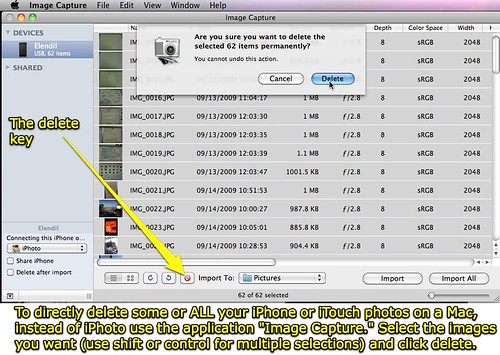
Find the Image Capture program in the Application folder of a Mac running OS X.
H/T to FreeiPhoner for this tip.
Does anyone know how to readily do this same process on a Windows computer?
Technorati Tags:
apple, images, iphone, ipod, itouch, mac, photos, touch, remove, photographs, delete
If you enjoyed this post and found it useful, subscribe to Wes’ free newsletter. Check out Wes’ video tutorial library, “Playing with Media.” Information about more ways to learn with Dr. Wesley Fryer are available on wesfryer.com/after.
On this day..
- Presentation Tips and Podcast Conference Learning – 2019
- Create a Maze Game in PBS Scratch Jr – 2016
- Lesson Idea: Analyze Political Fundraising Statistics with Comparative Ratios – 2012
- Oren Lee Peters – Stories of My Life – 2011
- Sounds of My World – My new sound blog – 2011
- Bypassing draconian Chinese Internet content filtering #learning2cn – 2010
- Great student project examples, lesson ideas and links integrating media #learning2cn – 2010
- Thinking about dark matter, the origins and size of the universe – 2009
- Hello from Hong Kong – 2009
- Flip Video First Impressions – 2008