
My recent experiences moderating comments on a relatively popular YouTube video have led to lots of learning, and the most recent example concerns YouTube “channel” comment moderation. By default, all comment moderation is turned OFF when you upload a video to YouTube, and moderation is turned OFF for comments people leave on your channel. Channel comments are similar to comments people write on your “profile wall” on Facebook, MySpace, or another social networking site. I wish it was possible to set a default moderation preference for all new YouTube video uploads in my channel, like you can with Flickr when you edit your profile settings for “Defaults for new uploads.”
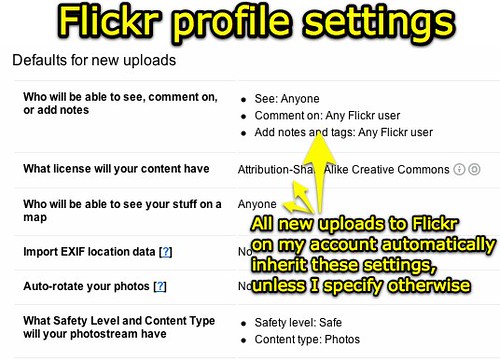
From what I’ve been able to figure out, you have to MANUALLY change moderation settings on EACH YouTube video if you want to turn on comment moderation on. I explained how to do this on my September 9th post, “YouTube comment moderation is great (and recommended) when videos go viral.”
Since videos in my YouTube channel have started to receive additional views after people watch Sarah’s response to President Obama’s speech, I’ve had to go in and turn ON comment moderation on those videos as well, even though none of the others are political and related to President Obama. Sadly, people have posted rude (and at times profane) comments on some of those videos, in part I think because they could not post similar comments on Sarah’s video where comment moderation WAS already turned on.
I just realized this weekend, however, that another “unmoderated window” for YouTube commenters was on my YouTube profile page. Since I had not turned comment moderation ON for my channel, several people had been able to leave rude and profane messages there. To turn YouTube channel moderation ON, when viewing your channel click the EDIT link beside “Channel Comments.” Then select the moderation setting you want and click SAVE CHANGES.
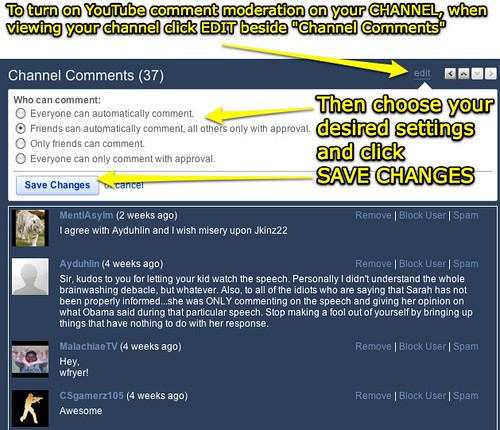
I think everyone should turn comment moderation on for YouTube channels as well as videos, whether the YouTube channel is a personal one or it is for an organization. The last thing you want after creating a YouTube channel for your school or classroom is to have a parent upset by profane comments left by others on your channel. If you select “Friends can automatically comment” as I have, you’ll want to be judicious in choosing who to accept as a YouTube “friend” on that account. The most conservative path is to require that ALL comments be subject to moderation.
Another feature I haven’t been able to find on YouTube, and would really like, is the ability to moderate comments from a single screen which are submitted to different videos as well as the channel page. YouTube does generate messages in your YouTube “inbox” notifying you that a new comment has been left which requires moderation, but this does not appear to be as fast and efficient as a combined “comment feed river” could be for all the content in a particular channel.
The topic of comment moderation reminds me of thoughts I heard from one of Clarence Fisher’s presentations several years ago, I think in his 2006 K-12 Online preso, “Globally Literate.” It might have been in one of his blog posts, however, I don’t recall. The point Clarence made was that as his students became more adept at blogging, they became less patient with him as the “gatekeeper” and moderator of their posts and comments. Eventually he changed their classroom blogging platform to one which permitted freer student content publishing but still maintained accountability. I think some of the angry responses I’ve seen on my YouTube videos and channel are a result of a similar frustration YouTube commenters have felt over my relatively slow moderation speed, and the fact that I am moderating comments in the first place.
Here’s the key takeaway: Consider your comment moderation options carefully when setting up or using ANY type of social media platform, but particularly do this when using a site like YouTube. Any video you publish there could potentially go viral, and even if it does not, unless you change the DEFAULT settings nothing is standing in the way of someone leaving a rude or inappropriate comment there which others can see.
If you know of more efficient / streamlined ways of moderating YouTube comments on multiple accounts or even on a single account, but moderating all video and channel comments from a single screen, please let me know. I’m rather relieved the amount of traffic and number of comments on Sarah’s video from September has slowed to a trickle, since I do have lots of other things to do with my time besides moderate them– But I would like to be better prepared for “next time” (if it happens) when a video I publish receives lots of attention and feedback.
For more on this topic, see my past posts “Criteria for moderating comments on a viral video” and “A hazard of moderating comments on a popular YouTube video.”
Technorati Tags:
comment, education, learning, moderation, technology, youtube, setting, settings, gatekeep, gatekeeping
Note: As of 1 Oct 2026, this is a FULL STATIC COPY of all 6,390 posts shared on this blog since 2003. Updated content and ideas from Wes Fryer are still available!