
SMS or cell phone text messaging alerts can be extremely handy. Research shows most people read text message alerts almost immediately, and when students have an unlimited text messaging plan no additional costs are incurred by them to receive SMS updates. The last three semesters I’ve used the lowest commercial version of TextMarks to send periodic text message updates to my preservice education students. This year, I’m helping our school debate team as a parent volunteer and wanted a free way to send text message alerts to team members. Last week I collected, from students who chose to opt-in to these alerts, their name, phone number, and cellular carrier. The cellular carrier is important because each wireless phone company uses a different email address domain to enable sending text messages using email. I learned about this a few years ago as a participant in the “Film on the Fly” cell phone videography contests. (See this post from April 2009 for our “Pi Day” entry from the previous month.)
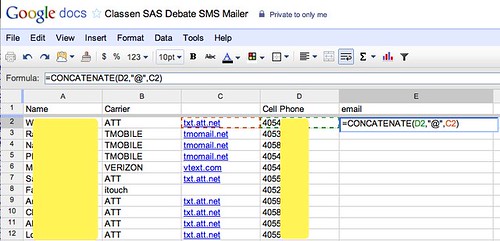
Today I created a Google Spreadsheet and used the CONCATENATE function to create or build the email address I needed for each student’s cell phone number. This Google Help page explains how the function works. The formula is shown below.
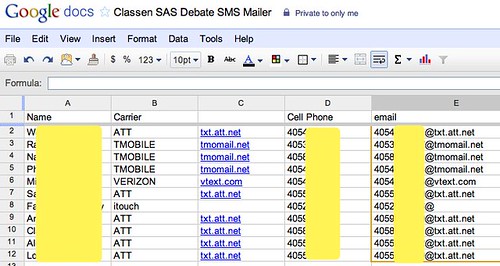
The results of the formula, after I “filled down” to copy it to all rows of the spreadsheet, are shown below. Each person has a custom email address using their cell phone number and the appropriate mail domain for their cellular provider.
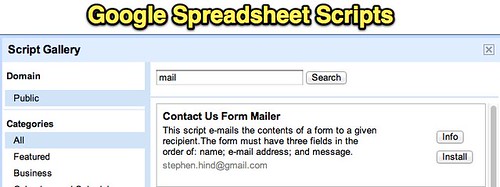
The next step was sending the email message. I tried a test message to myself first, which worked fine, so then I messaged the students. I simply copied and pasted the email addresses from my spreadsheet into an email message, but it’s definitely possible to get fancier than this and use Google Scripts to send email. For example, the “Contact Us Form Mailer” is a free script which can send a custom message to email recipients specified in a Google Spreadsheet. To find this script and add it to your Google Spreadsheet, choose TOOLS and SCRIPT GALLERY, then search for MAIL.
This 1 minute, 20 second video shows how this can work. You need to name your three columns exactly as they are specified in the script.
If you want more assistance with this process, check out the Google Apps Script Tutorial: Automating a Help Desk Workflow. This is more complex than what I attempted this evening, but it’s AWESOME to see the power of scripting in Google Spreadsheets and glimpse some of the flexible power which it can unleash for us. Also check out FormEmailer, which appears to be a more robust and customizable free solution.
I’m going to share this Google Spreadsheet with my son’s debate teacher and show her how she can use it to send SMS alerts to students as well as parents who want to receive them. I also may create a custom form tied to the spreadsheet so she can solicit new sign-ups with an online form. The one change I’ll have to make to the form is inserting a formula in column C so the celluar provider’s email domain is added automatically depending on the carrier they specify. The English WikiPedia page, “List of SMS gateways” includes an updated list.
Have you found a simpler, FREE way to send SMS text alerts to your students or to other groups? If so I’d love to learn about it. (I’m not talking about a “free trial version” of a commercial service, however. I’m talking FREE as in NO COST, ever.) I tried Textmarks Lite, but found the dating / “meet singles in your area” ads which are included to be potentially offensive to some of my undergrad students. Certainly that’s not appropriate to use for K12 settings.
Learn more about the communication tools I’ve used the past few semesters with undergrad students in my December 2010 post, “Lessons Learned Teaching EdTech to PreService Education Students.”
Technorati Tags: classroom, code, free, google, sms, students, teacher, text, alert, alerts, textmarks, spreadsheets, script
Note: As of 1 Oct 2026, this is a FULL STATIC COPY of all 6,390 posts shared on this blog since 2003. Updated content and ideas from Wes Fryer are still available!
Comments
24 responses to “Use a Google Docs Spreadsheet to Send Text Message Alerts to Students”
I just found this site this morning: http://remind101.com/ it says it is free. I would contact them about their long term business plan but it is specifically set up for EDUCATION. I have been using Google Voice and that is good except can’t really do mass texts so I am excited about this one.
I just found this site this morning: http://remind101.com/ it says it is free. I would contact them about their long term business plan but it is specifically set up for EDUCATION. I have been using Google Voice and that is good except can’t really do mass texts so I am excited about this one.
Hi Wesley,
Cool post! A few years back we ran an excel macros just like this, using phone carrier mobile gateways to send messages. It worked, but the problem was it was unreliable. The carriers would only sometimes deliver the messages. When we started to hit a few hundred messages a day they’d shut us down.
My brother and I built, and just opened http://www.remind101.com it will let you send a broadcast message to all your students instantly and it’s safe because you don’t have to share numbers. Also, you don’t have to know the carrier which is convenient. Students can simply text a your code to a number and they’re subscribed.
It is 100% free, and there are no ads. We’ll eventually add premium plans with value adds but there will always be a free version. We built it working hand-in-hand with K-12 teachers, so I’d love your feedback on the product and hope you like it!
@brettkopf:disqus
co–founder of remind101
You might want to try schoology. A fantastic service with a facebook like interface that allows students to opt in for text messages for everything from assignments to alerts. It is free.
Nice. Too bad http://docs.google.com is blocked by OKCPS, for some reason!
Nice. Too bad http://docs.google.com is blocked by OKCPS, for some reason!
Spent the last few hours (hurricane, school is out, I am bored) putting together a form that collects the info, combined with your concatenate formula (using vlookup on another sheet with all the carriers and gateways), along with FormEmailer to send automatic “subscription confirmations”. It works but seems crude…then I read the post about Remind101 and wonder if I should have spend the last few hours picking up tree limbs…
For an announcement only list like this example, I’ve just been recommending Twitter. The teacher creates a Twitter account for the class, and then the students can text “follow CLASSNAME” to 40404. They don’t need to have a Twitter account for this to work, so it can even be used with students younger than 13.
Wes: FYI…we have a couple of teachers trying out Remind101 this fall at Montana Digital Academy and so far, we like the service…
I’ve been taking a look at http://cel.ly/ as a Free way to send alerts and handle group SMS messaging. They seem to have educators in mind with this service although it’s not exclusively an education site. It was a simple sign-up process, allows multiple groups, unlimited participants, open or curated conversations, and alerts. You can also manage and post to groups from the web site.
This is a GREAT tip, Ryan – thanks! I went ahead and setup a channel for us to use with speech and debate students:
http://twitter.com/classenspeech
This looks like a better option, long term, than going with a beta service like Remind101 which I’m sure will charge for its service after it goes out of beta.
I found this post to be very interesting. I am with a company that allows students to apply to several HBCUs at the same time. We have thousands of students and parents that we would like contact. Other than the time and effort that would go into creating this google spreadsheet, what are some of the problems you think we might encounter? Is twitter a more viable option for us?
Robert: I think two options have been highlighted in the comments here which ARE more viable: Twitter and Remind101. Twitter is probably the best, as Ryan Collins highlighted you don’t have to be on Twitter or have an account, you can simply text “follow USERID” or “subscribe USERID” to 40404 and then you receive updates. I went ahead and set this up for our speech and debate team at Classen SAS:
http://twitter.com/classenspeech
That is the best option for a ‘broadcast only” channel for SMS updates, I think, because like a blog (instead of a mailing list) you don’t have to keep track of numbers or addresses. It’s a self-serve update channel: people can subscribe if they want, and unsubscribe if they change their mind.
http://remind101.com looks good also, but it’s in beta and I’m pretty confident they’ll start charging when they move out of beta. They offer more features, however, and it can still be a ‘self serve” situation I think. Hopefully their prices are reasonable. You DO get the person’s name with Remind101 and that is a benefit. I don’t think you really know who is following you with SMS messaging only on Twitter if they don’t create an account.
That’s my take. What do others think?
When you use this TWITTER method – can you track to followers who followed via 40404?
No, I don’t think so. I’m not positive, however. I’m thinking people have to create an account for you to track them as a follower.
Hi Wesley, I made a tutorial on how to send tweets from a google spreadsheet. The script is very simple, but I believe it can be very beneficial to those that have an audience in twitter and want to send frequent updates at a specific interval.
http://gudkopy.com/?p=118
Besides Remind 101 (mentioned in several comments below) Cel.ly is also worth checking out and using:
http://cel.ly/
HI Ramiro,
I’m looking for an app like you described for Twitter. Seems like you link is broken though.
Hey I found a Google add-on that does this too. You have to pay but it’s pretty inexpensive and a lot less complex than having to figure out the carriers. For anyone that is interested here is the link: https://chrome.google.com/webstore/detail/text-gblaster-sms-texting/pbbgimdnldlfkdichlcaonmmbfnddibh?utm_source=permalink.