
I generally import photos from my iPhone onto my computer using iPhoto, and then choose the provided option to delete / remove the photos from my iPhone afterwards. If you choose to leave photos on an iPhone or iTouch after importing some or all of them, however, is there a way to later delete them all from the computer keyboard instead of deleting each one by one on the iPhone? Fortunately, the answer to this question is “yes,” and the application you need (on a Mac) is “Image Capture.”
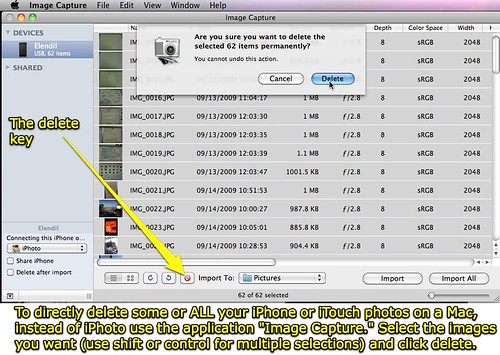
Find the Image Capture program in the Application folder of a Mac running OS X.
H/T to FreeiPhoner for this tip.
Does anyone know how to readily do this same process on a Windows computer?
Technorati Tags:
apple, images, iphone, ipod, itouch, mac, photos, touch, remove, photographs, delete
Note: As of 1 Oct 2026, this is a FULL STATIC COPY of all 6,390 posts shared on this blog since 2003. Updated content and ideas from Wes Fryer are still available!