
(cross-posted from Instructional FAQs for Yukon Public Schools)
When you post a video to YouTube, it is a good idea to turn ON comment moderation. As of this writing in February 2012, it is not possible to make “comment moderation ON” a default setting in YouTube. Follow these three steps after uploading a video to turn on comment moderation.
First, click EDIT info on the video you want to change.
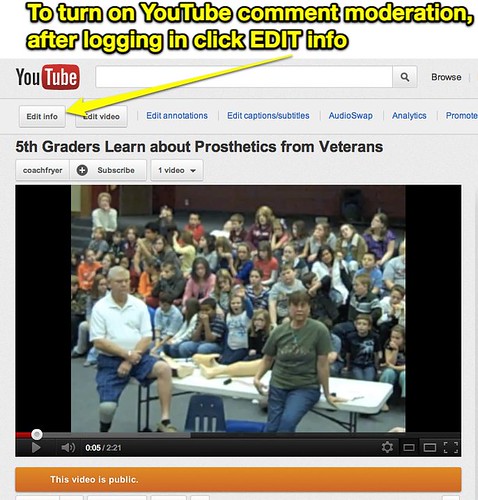
Second, click SETTINGS.

Third, under COMMENTS choose ALLOW ALL COMMENTS WITH APPROVAL ONLY, then click SAVE CHANGES.
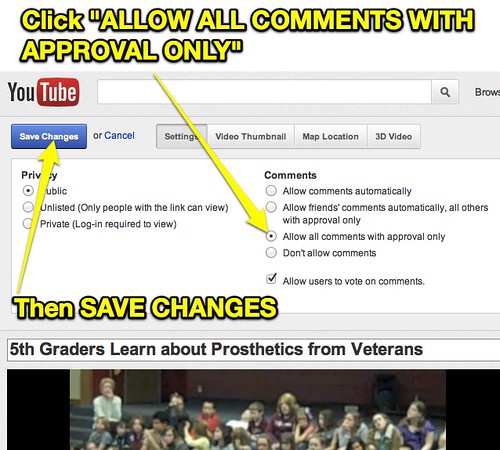
Now you’ll need to approve comments on that video before they will show up publicly for others to view.
Technorati Tags: howto, tutorial, youtube, comment, moderation
Note: As of 1 Oct 2026, this is a FULL STATIC COPY of all 6,390 posts shared on this blog since 2003. Updated content and ideas from Wes Fryer are still available!
Comments
One response to “How to Enable Comment Moderation on YouTube Videos”