
I use the free PodPress plug-in for WordPress to create browser-based Flash player links for audio and video podcasts I publish here on “Moving at the Speed of Creativity.” PodPress is not available for Moodle, wikis, or other blog software programs, however. If you are publishing a mp3 audio file podcast to your school website or another server, how can you provide the same user-friendly Flash player functionality on those sites?
Thanks to Amit Agarwal I learned how to do this tonight. I used the following code to embed a clean, unbranded Flash player from Google on a webpage in my “Exploring the Biblical World Through Google Earth” course I’m teaching on Wednesday nights at our church for five weeks this fall:
In our class Moodle course (guest logins ARE permitted) the Flash player links look like this:
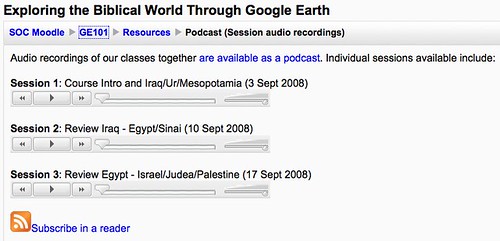
I like the fact that this is not branded, is clean, and is pretty straightforward to do. This requires a little bit of “code work” but the result is certainly worth it. I think the ability to do minor “code tweaks” like this is an important skill to have in our era of user-created content.
Technorati Tags:
embed, flash, player, mp3, blog, moodle, wiki
Note: As of 1 Oct 2026, this is a FULL STATIC COPY of all 6,390 posts shared on this blog since 2003. Updated content and ideas from Wes Fryer are still available!
Comments
One response to “Embedding mp3 audio files with a free flash player in Moodle, a wiki or a blog”
Thanks Wes
Looking forward to trying this in our College moodle site!
Patricia