
I received a question recently from a friend who is having trouble importing MPG video files into iMovie. Here’s my reply to her. (These instructions apply to Mac/Apple users who have iMovie.)
First, be sure you have Flip-4-Mac installed. It is free from Microsoft. Once installed, you should be able to open and view MPG files in QuickTime. Some Windows Media files (like those created with PhotoStory3) can’t be opened on a Mac even when Flip-4-Mac is installed. Most can, however.
Once you can open the file in QuickTime, you can use QuickTime Pro to export the files as “DV Stream” files. These files can be big (depending on the length and quality of the original video file) but you should be able to import them without a problem into iMovie. QuickTime Pro costs $30. When you buy it, you’ll get a license code. Save this in email or another secure location. You’ll copy that license code and then enter it into the QuickTime preference settings, to activate QT Pro. You may need to quit QT Pro and then open it again after entering your registration code. You shouldn’t have to restart your computer, however.
When you have a MPG file open in QuickTime Pro that you want to convert, choose EXPORT and choose “Movie to DV Stream” as the format option at the bottom.
If you want a free option for doing this, you can download, install and use FFMPEG X. You should be able to use it to convert MPG files and convert them to DV stream / DV format with it. It’s free, but not quite as easy to use as QuickTime Pro.
Once you have the file converted into DV format (it should have the file extension “dv”) then you should be able to import it and edit it without a problem in iMovie.
Good luck!
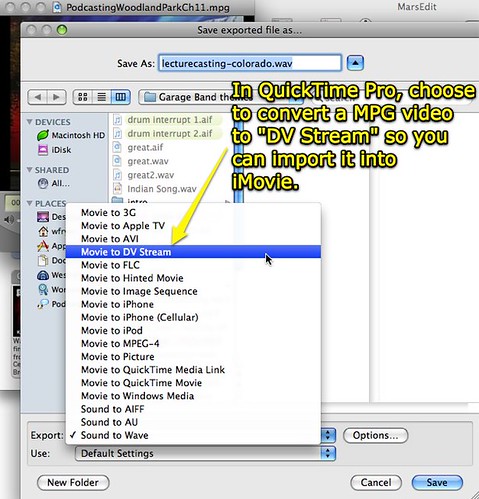
Anyone have other suggestions / methods for importing MPG video clips into iMovie?
Technorati Tags:
apple, mac, imovie, import, convert, quicktime, qtpro, pro, ffmpeg, ffmpegx
Note: As of 1 Oct 2026, this is a FULL STATIC COPY of all 6,390 posts shared on this blog since 2003. Updated content and ideas from Wes Fryer are still available!
Comments
7 responses to “How can I import MPG files into iMovie”
Perian Tools might do it was well (and is free) worth it for all the file types in enables in QT
http://perian.org/
Great, thanks for suggesting Perian as well Alan.
MPEG Streamclip is another useful piece of freeware that is very good for converting formats, although it does require Quicktime Pro to work. It’s also very good at extracting video and audio from un-copyrighted DVDs.
http://www.squared5.com/
You can also use the new version of Handbrake – Open Source and will dump your files into a number of QT/iMovie friendly containers.
I use format factory for all of my converting projects. It works really well for putting wmv files on iPods too!
Importing MPEG to iMovie (including iMovie ’11/’09/’08), only to find
MPEG files are grayed out. Recently, Many Mac users have come across
such a problem. Usually, iMovie does allow the import of MPEG files.
However, if MPEG (MPG) files are muxed (multiplexed) MPEG-1 or MPEG-2
video, iMovie will refuse to import the MPEG (MPG) files. Then you need
to use some converter software to convert MPEG to iMovie compatible
format for use in your iMovie project.
This article will show you how to convert MPEG to iMovie compatible
format so as to successfully import MPEG into iMovie/iDVD and more
at http://www.bigasoft.com/articles/how-to-import-mpeg-to-imovie.html
Naturally the linked page fails to mention that the “free software” is a trial version, and it will only process up to 5 minutes before stopping.
Thumbs down.