
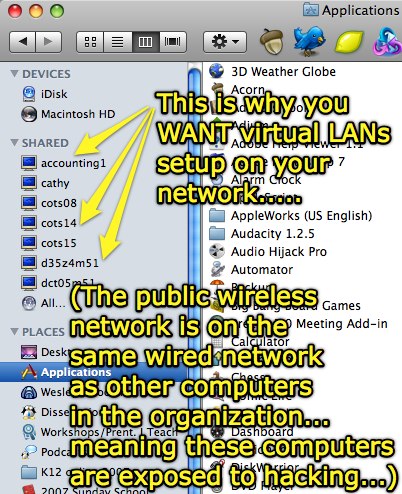
I’m at a church this evening for a workshop on Internet safety and safe online social networking. I’m thrilled they have free, open WiFi access (that is very fast, incidentally) but dismayed to see they’ve put their wireless access points on the same network as their wired, administrative/staff computers. How do I know this? The finder Window of Mac OS 10.5 shows all computers that are visible/browsable on the network:
According to WikiPedia’s current entry, a VLAN or “virtual LAN” is:
…a group of hosts with a common set of requirements that communicate as if they were attached to the same wire, regardless of their physical location. A VLAN has the same attributes as a physical LAN, but it allows for end stations to be grouped together even if they are not located on the same LAN segment. Network reconfiguration can be done through software instead of physically relocating devices.
Functionally in this context, if this church had VLANs then I (as someone on the public wireless network) would NOT be able to see, browse to, and potentially “hack into” any of the organizations’ computers from the wireless network. Of course I’m not hacking into anything, I’m just using the Internet access to browse other sites, but the fact that POTENTIALLY someone could directly ping and access those computers IS a problem of which administrators should be aware.
When someone at a school decides to bring a wireless access point and plug it into the school’s computer network via an open ethernet port in their classroom, they potentially put all the computers on the network at risk for malware and hacking attacks. Organizational network administrators (including both schools and churches) need to use an intrusion detection solution like Snort (free) or TippingPoint (commercial) to proactively defend wired networks against this sort of threat. Turning OFF DHCP on the network can help prevent casual users from gaining unauthorized access to the Internet on your network, but free tools like Kismet and Airsnort permit even casual hackers (script kiddies) to obtain valid IP credentials, a valid MAC address, and even a WEP password (using a tool like Aircrack.)
The lesson: Purchase networking switches which support VLANs, and implement login processes (with secure passwords) within a networking architecture using VLANs. Monitor your network utilization (with InterMapper or something similar) and use an intrusion detection solution!
Technorati Tags:
security, vlan
If you enjoyed this post and found it useful, subscribe to Wes’ free newsletter. Check out Wes’ video tutorial library, “Playing with Media.” Information about more ways to learn with Dr. Wesley Fryer are available on wesfryer.com/after.
On this day..
- Learning about Schoolwide WordPress Blogs with Andrea Hernandez – 2015
- Tough Creative Love: The Why and How of Creative Action – 2012
- Breakthrough Thinking by Peter Diamandis – 2012
- Encouraging Creativity in Education through Community & Technology – 2012
- Leading a Culture of Innovation by Sir Ken Robinson – 2012
- Creating Oral History Interview Videos on an iPod Touch – 2011
- iPad Doorprizes, Clearly Announced Conference Recording Permissions, & Ustreaming #micon – 2010
- Carl Anderson on Learning and the Purpose of School (video) – 2010
- Controversial Anti-Abortion Education Campaign at UNT – 2010
- Utilizing Social Media (in schools and for citizen journalism) #collab21 – 2010
Comments
3 responses to “Why your organization needs virtual LANs”
Most consumer grade networking switches (which is what you tend to find in smaller offices) do not have good VLAN capability, therefore it would probably be easier to plug a wireless switch into another switch (without wireless) that hosts the wired computers. Let the wireless switch perform DHCP for the wireless connections and turn off DHCP on the wired switch, using static IPs instead. Since you can put the wireless switch on one VLAN and easily set the wired switch on a second one, this would slow down the casual “hacker”. Of course, if you want to stop someone who is determined then don’t put your computer on a network at all.
Thanks for reminding us to be more careful!
OK, so my comment has nothing to do with your very informative article. Inquiring minds have to know: What quick links do you have across the top of your 10.5 Finder Window? You teased us with the first four…
I grabbed some screenshots with Skitch, Tim, here are the quick launch icons I use:
Here are the icons I keep in the dock:
I also updated my linked list of Macintosh applications I use (on a jot.com wiki) these images, as well as links to new apps I’ve discovered and started using in the past 3 months.