
The past few years I’ve created comprehensive lists of all the software programs I run on my Apple laptop computer in December and/or January. Perhaps because of holiday downtime, this has been the month when I’ve taken the time to either perform a clean installation of my operating system and reinstall all my apps, or setup a new laptop with new apps. My archived lists from Feb 2010, Dec 2010, and Dec 2011 are also available. I’ve linked all of these on the “Mac Apps” page of my professional wiki. It’s interesting to see how these app lists have changed over the years and reduced in number. In part I think that reduction is because I use more web-based applications, but it also might reflect how I tend to try out fewer client-side computer applications these days. I’m definitely using more mobile apps, quantity wise, than ever before.
I’m not doing a clean install or setting up a new Mac laptop this month, but I’ve gone ahead and created two short lists of apps. Instead of text-based, linked lists this time, however, I just made some annotated screenshots with Skitch and Seashore.
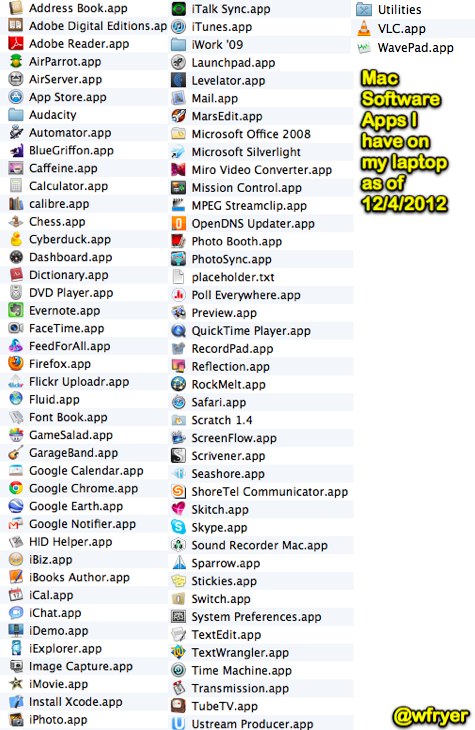
These are the software applications I have installed on my MacBook Air laptop as of 12/4/2012:
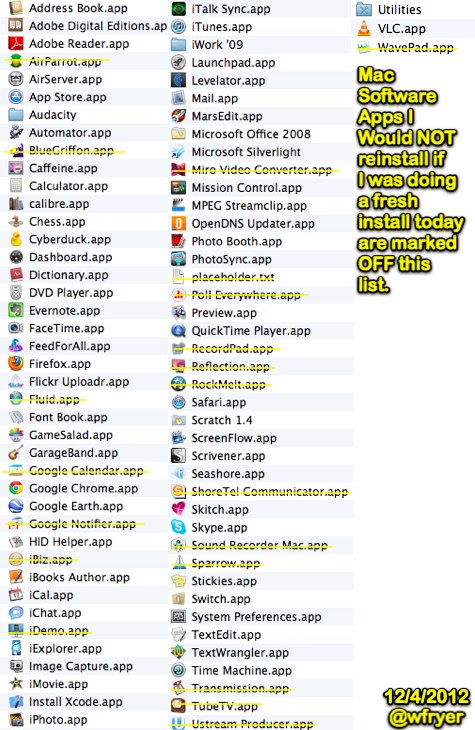
If I was to perform a “clean install” of my hard drive now (which I’m incidentally NOT planning to do) I’d just install a subset of these apps. The apps I’d exclude / not install are marked out of the screenshot below with yellow lines.
Of these apps I’d reinstall, here are the apps I consider absolutely VITAL to my personal productivity and I couldn’t live without. I use many of these every day, all of them at least once per week. I listed these in alphabetical order and linked those which are third party apps, in case you want to check them out.
- AirServer
- Audacity
- Caffeine
- Cyberduck
- Evernote
- FeedForAll
- Google Chrome
- iCal
- Keynote (part of iWork)
- Levelator
- MarsEdit
- PhotoSync
- Seashore
- Skitch
- Switch
- TextWrangler
It’s interesting to note that at this point in my professional life, Microsoft Office or a MS Office variant does NOT make this list. Google Docs / Google Drive, on the other hand, DEFINITELY would if I was including web-based apps.
Which Mac apps would make your “VITAL list” that I haven’t included here?
Technorati Tags: apple, apps, laptop, mac, software, technology, computer, recommendations, desktop
If you enjoyed this post and found it useful, subscribe to Wes’ free newsletter. Check out Wes’ video tutorial library, “Playing with Media.” Information about more ways to learn with Dr. Wesley Fryer are available on wesfryer.com/after.
On this day..
- Great Videos To Show Students About NASA and Orion – 2014
- Video Tutorial: Creating Narrated Art or Photos with AudioBoo for iPad – 2013
- Publish a Free Digital Magazine with Zeen – 2012
- Virtual Participation Options for Dec 14 and 15 Google Tools Workshops – 2010
- Lessons learned using Ustream Recorder for iPhone – 2009
- Share password protected online videos with Mobile Me – 2009
- Connecting place to stories with Google Maps – 2008
- VoiceThread supports template-based digital storytelling! – 2008
- Two new video podcasts from Ford Island, Hawaii – 2007
- 1:1 Computing Guidebook – 2005
Comments
4 responses to “Whacha Runnin’ on Yer Mac These Days? (Dec 2012)”
Thanks for these lists Wes, it’s always interesting to compare notes!! One app that I didn’t see on your list, that is essential for me is Dropbox! I move between several computers each day, and Dropbox helps me to stay organized, since I can access my files from any computer.
If you were to set up a new Mac these days, AND if you wanted to include Office, you would find that your Office 2008 would need to be updated to 2011. Although most of my productivity work is in Google Docs, I would need some page layout program (either Office, Open Office, or Pages) to produce print-ready files, especially those that are graphic intensive. And, when working with large data sets, or when I need to print a “tiled” banner, Excel is my go-to app!
I also would install Reflection again, since I have found it’s a great way to present multiple iPad screens in workshops that I have facilitated (although I see you have AirServer on your list, so maybe that works the same?)
One last thing I have found helpful, is SmartConverter — a free OSX App for Video Conversion, available in the Mac App store: https://itunes.apple.com/us/app/smart-converter/id447513724?mt=12
Thanks again!
Thanks for these lists Wes, it’s always interesting to compare notes!! One app that I didn’t see on your list, that is essential for me is Dropbox! I move between several computers each day, and Dropbox helps me to stay organized, since I can access my files from any computer.
If you were to set up a new Mac these days, AND if you wanted to include Office, you would find that your Office 2008 would need to be updated to 2011. Although most of my productivity work is in Google Docs, I would need some page layout program (either Office, Open Office, or Pages) to produce print-ready files, especially those that are graphic intensive. And, when working with large data sets, or when I need to print a “tiled” banner, Excel is my go-to app!
I also would install Reflection again, since I have found it’s a great way to present multiple iPad screens in workshops that I have facilitated (although I see you have AirServer on your list, so maybe that works the same?)
One last thing I have found helpful, is SmartConverter — a free OSX App for Video Conversion, available in the Mac App store: https://itunes.apple.com/us/app/smart-converter/id447513724?mt=12
Thanks again!
After years with Dell products, I have just gotten my first MacBook Air laptop, so your post is extremely timely (at least for me!) Thanks!
Hi,
Very useful list, as much for the ones that are being deleted.
Does AirServer have any advantages over reflections?
Switch is a great find for me, is is currently ripping through over 100 mp3s sorting out bitrates.