
(This is an edited, shorter version of the post, “Use Google to Identify Plagiarism & Teach How to Avoid Committing It“)*
The past couple weeks my 7th grade daughter has been working on a National History Day project for her social studies class. Today she proudly showed me the display board which her group created about our president.
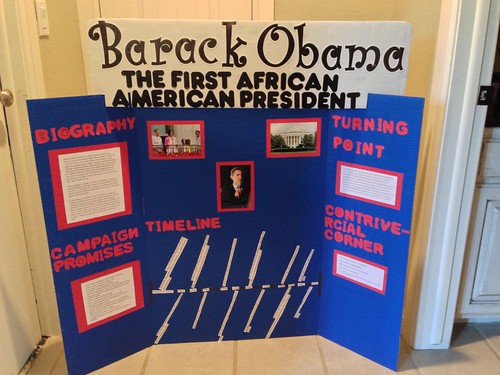
Of course I want to recognize and encourage the hard work she has put into this project over multiple days, but the first thing I thought when I started reading her group report was, “Did the students simply copy and paste this information from the web or did they write this in their own words?”
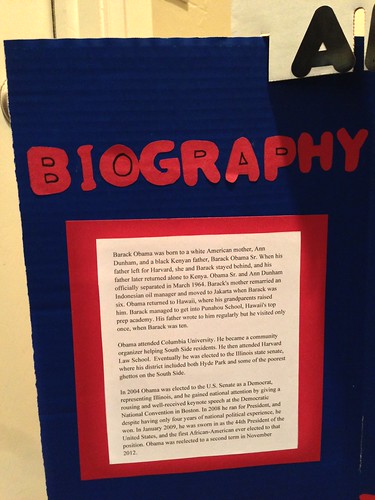
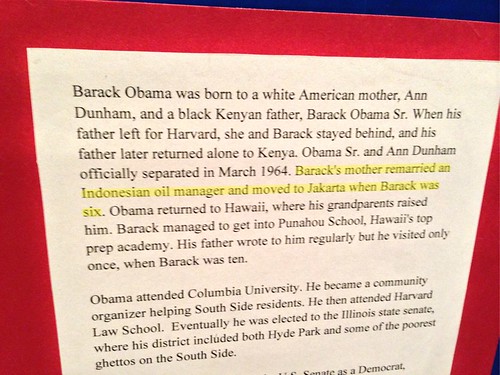
To find out, I googled one of the sentences in the first paragraph of the report. I actually used Siri on my iPhone to simply read this sentence, and let Google do the search:
Barack’s mother remarried an Indonesian oil manager and moved to Jakarta when Barack was six.
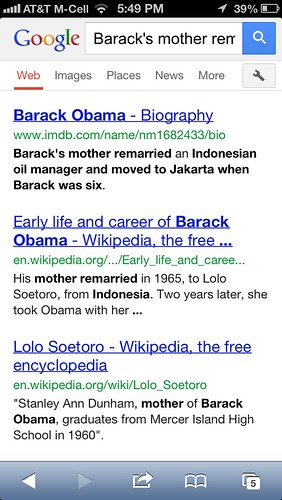
The first result is the IMDB entry for President Obama, which has that sentence in it word-for-word, verbatim.
I asked my daughter if her teacher had discussed plagiarism with her, or if ANY of her other teachers in 7th grade had discussed plagiarism. She said no. She knew their group was supposed to write their report in their own words, but the group member who was responsible for that portion of the report turned in her article on a flash drive and other members hadn’t reviewed it. They simply printed it and added it to the display board.
I explained to my daughter that clear plagiarism like this, when she (or her group members) copy something word-for-word and don’t cite it as a quotation, is a reason to get an “F” on a project like this at many schools and colleges. She was crushed to hear this.
Tools like TurnItIn.com are used by many colleges and universities to address plagiarism, but I’m not aware of any K-12 schools in Oklahoma paying for it or a similar service. In cases like this, however, it’s not necessary to pay for a service to identify plagiarism… a simple Google search with quotation marks (an exact phrase search) is all that’s needed.
Are you teaching your students about plagiarism, and how to use Google to check themselves as well as their classmates’ work? Every one of us teaching students, who do any type of Internet research, needs to be talking about these issues. While the Internet makes it incredibly easy to copy and paste content INTO a report, tools like Google also make it incredibly easy for teachers (and parents) to identify plagiarism when it happens. See my my January 2008 post, “Plagiarism, WikiPedia, and encouraging students to CARE about digital ethics,” for additional thoughts on this topic.
* This version excludes the last six paragraphs of the original post, as well as an earlier paragraph referencing some details about past discussions I’ve had with the teacher who assigned this project. I’m sharing this post again in an edited / shortened version because of a friend’s request.
Technorati Tags: edtech, google, research, technology, plagiarism
If you enjoyed this post and found it useful, subscribe to Wes’ free newsletter. Check out Wes’ video tutorial library, “Playing with Media.” Information about more ways to learn with Dr. Wesley Fryer are available on wesfryer.com/after.
On this day..
- Learning About Wellness from David Mochel – 2018
- Tweeting Our Learning in USD 383 – Manhattan, Kansas – 2015
- Educational Vouchers are a BAD Idea for Oklahoma Students and Families (HB 3398) – 2014
- A Story About Parental Feedback on a Student Blog – 2012
- Another good reason for 1:1 learning at college – 2010
- Students interviewing students over Skype at school – 2009
- Join in book talk conversations about Little Brother by Cory Doctorow – 2009
- Does your organization embrace innovation and creativity, or seek to shoot change agents? – 2009
- Mathcasts and Presidential reports on VoiceThread – 2008
- Boundaries of IM and SMS messaging with students – 2008
Comments
2 responses to “A Story About Plagiarsim and Group Projects”
I made the exact same mistake when I was younger too! I think I may have been in the 6th grade and just copy and pasted facts of an event in a paper. I got in trouble for it by my teacher and had a meeting with my family and teacher. They discussed with me on what I did wrong and why it was wrong. I’m glad that I made the mistake though because it taught me right from wrong and I wont make the mistake of plagiarism again. Thanks for the post!
I honestly think that part of the issue is that formal report writing has fallen out of favor in a lot of classrooms, particularly in K-8 environments. There used to be a greater expectation that students would go through all of the elements of good research (finding resources, evaluating the sources, processing the information, paraphrasing the data in your notes, THEN writing) in many classrooms, but that has been a lost expectation in many districts.
In this research-rich environment, I think these skills are even more important due to the scenario you are citing.
Just because we don’t use 3×5 cards anymore for this doesn’t mean that the skills taught are useless; we need to use it in a new context (like Evernote… 🙂 ).