
On May 28th I wrote about the importance of podcast publishers including details about each episode in their podcast file meta data and actual RSS feed, and not just on their website links to each show, in the post “The Joy of Juice Receiver and PodNova.” One of the great podcast feeds I mentioned as needing to add episode details for each show was FORA.tv, and as I noted in early June they fixed that issue. Last night as I downloaded new podcast episodes and synced them to my iPhone with Juice Receiver and iTunes, it was great to see FORA.tv continues to include episode details in their feed, making it easy to identify which episodes I’d like to keep and which ones to delete:
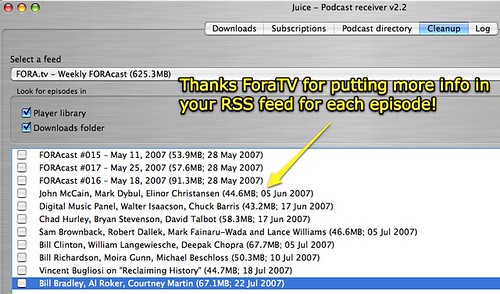
Adding meta data to each podcast and creating the “web feed” or “RSS feed” is likely the most complicated part of teaching someone else how to publish a podcast. Whether someone has created an audio-only podcast, an enhanced podcast (still images with narration and/or music) or a video podcast, each file needs to be linked within a “web feed” for it to definitionally be a podcast others can “subscribe” to with their podcatching software (like iTunes) or other aggregator software.
What are the ways you’ve found are easiest to add meta data to podcasts, create an RSS feed and add individual podcast episodes WITH details about each show? I created this short handout in the spring as part of my intermediate podcasting workshop to describe what to do after someone creates a podcast, to publish it, avoid the “chipmunk effect,” and link it within a feed. As described in the handout, adding details about each episode can be readily done with iTunes (free and cross-platform) and podcasters can also add show “album art” (which is included as part of the uploaded audio file.)

These are the main ways I know of to create a web feed and add a podcast episode:
- Create a free blog account with a site like Blogger and create a new post for each show. (I use this method with WordPress for my own podcast, since WordPress creates an RSS feed for each category and this lets me have a different subscription channel (burned with Feedburner) which people can use to subscribe: separately for podcasts or for all posts, text-blog entries as well as podcasts.)
- Use a free web-based service like Podchains to create your web feed. (The last time I tried using Podchains, however, for some reason it wasn’t compatible with Feedburner. The feed Podchains created couldn’t be “burned” so Feedburner could track statistics on it. This may have changed lately, however.)
- Use del.icio.us to make your feed: Save a bookmark for your new podcast with a unique del.icio.us tag, then use the RSS feed for that tag within your del.icio.us account (at the bottom of the page when you’re viewing that tag) as your RSS feed subscription address. With this method, you can take the additional step of burning that feed with Feedburner. You won’t be able to include podcast shownotes in this webfeed, however, like you can with a blog site.
- Use commercial software like Podifier to create and upload your RSS feed.
- Have your district buy an Apple Podcasting Server and use the built-in software tools to upload new podcasts into web feeds.
- Download and install free LoudBlog software (a modification of WordPress specifically for podcasting) to your district server and setup permissions for teachers to publish their podcasts, similar to what they can do with the Apple Podcasting Server. In addition to directly uploading podcasts, adding episode info and categories, teachers can add podcast shownotes for each episode too with Loudblog. This is being used by San Antonio ISD teachers in their district SCRIBE initiative.
- Use the free or commercial version of a web-based podcasting service like PodcastPeople. They will host your podcasts, let you upload episodes, and handle the web feed details.
- Use a commercial podcast hosting service like Liberated Syndication (which offers unmetered bandwidth at reasonable prices, a BIG deal for very popular podcasts) to handle your hosting and web feed details. I have not used LibSyn but I know very savvy podcasters who do (like Tim Wilson) and I think you have to ftp podcast epsiodes to your webserver. That is a disadvantage for most teacher podcasters, and not as easy an option as a browser-based publishing option like the Apple Podcasting Server, LoudBlog, PodcastPeople, etc. Unmetered bandwidth for prices that start at $5 per month IS a big advantage, however.
That pretty-well exhausts my current knowledge of viable options for publishing educational podcasts with a web feed. I have played a little with Gcast, but Bob Sprankle recommends PodcastPeople over Gcast for reasons he explains in his podcast about his experiences with both sites. One more tip, if you’re using WordPress and able to install your own plug-ins (something you cannot presently do with some free wordpress accounts) you’ll definitely want to use the free PodPress plug-in. Since it places your podcast into a Flash-based player, however, it is important you take steps to avoid the chipmunk effect!
Are there others options I’m not including here, that are relatively straightforward and simple for teachers to use when publishing their podcasts?
Note: As of 1 Oct 2026, this is a FULL STATIC COPY of all 6,390 posts shared on this blog since 2003. But updated content and ideas from Wes Fryer are still available! Visit wesfryer.com/after for a complete list of my current social channels and websites where I share!
Comments
4 responses to “Options for podcast publishing and web feed creation”
Wes,
I host with Bluehost and they have use a program called Fantastico to auto install a variety of PHP based software, including wordpress. To create a feed, I simply added a custom field, “enclosure”, per instructions on WordPress.org. I categorized that as a “Podcast” and created a link to that category feed.
I upload via FTP for the file for the enclosure as well as other formats – not in the enclosure but available on the site.
My question is, what meta fields describe your podcast? I would imagine you could add custom fields for these in wordpress as well.
Thanks,
Matt
Wes,
I use MyPodcast.com It’s a free web based service much like Podomatic.com but, with unlimited storage and unlimited downloads. It also provides the RSS feeds for iTunes, google, etc. The only caveat is it puts a 5sec ad for itself in the podcast, but you can put it anywhere you want. I’ve been uploading some of the BLC07 sessions here http://techclub.mypodcast.com
Matt: Thanks for letting me know about Fantastico, I hadn’t heard about that. I use POWWEB for my blog and podcast host currently, but have configured the wordpress install manually. For my podcast meta data, I just put in title, artist, album, year, genre, and upload album art using iTunes. I don’t do anything else as far as custom fields.
Kern, thanks for letting me know about MyPodcast.com, I’ll check that out as well as your podcasts from BLC07!
I love the podcasting movement with schools currently. I sit on a board of a school in Indiana and are exploring hiring a firm called K12 Learn that does all of the hosting for schools interested in using podcasting in the classroom. The thing we like about them (even thought they are a new firm, is that the podcasting is focused only on schools, so there is no worry about non-suitable content being posted…ec.