
Thanks to a helpful blog comment from Sue Waters, I learned this week how to use TweetScan to create an RSS feed for the direct messages I receive in Twitter and monitor those both in Google Reader as well as Safari RSS. If you are a Windows user (or like me, predominantly a Mac user who has to use Windows frequently) you can download the free public Beta of Safari 3 for Windows.
I’ve been using the RSS support features of the Safari web browser for several years to keep track of new comments on my blog. By saving an RSS feed in the “bookmarks bar” which is just below the the top toolbar, Safari displays a number whenever a new blog comment is received on the toolbar itself (the folder name) and I can quickly select the appropriate feed to view the comment(s):
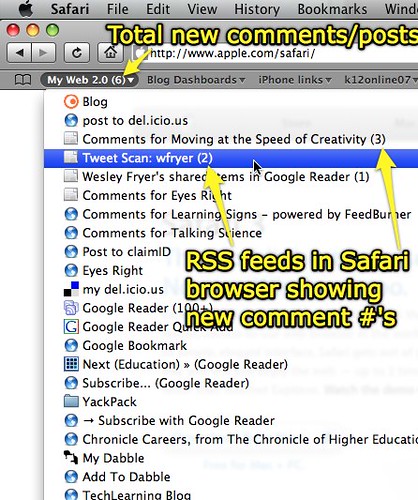
This is very handy because it does not require me to actually visit a link to see if I have new comments. If new comments have been posted, they show up as a number that is readily viewable in the upper left corner of my web browser. I have been thinking a lot in the last six months about attention, the “attention economy,” and how our attention is similar to a radar screen.

As the quantities of information and conversations continue to grow all around us, I think it is not only sensible but MANDATORY that we find better and more efficient ways to construct and manage our personal “dashboards” for digital information to which we want to pay attention. Using Twitter, Tweetscan, and Safari RSS in this way is an example of creating a personal information dashboard which facilitates communication in the attention economy.
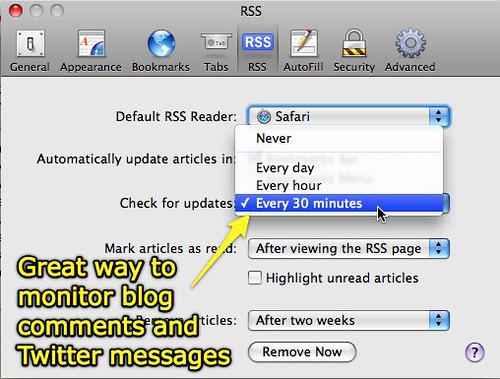
Safari will automatically check saved feeds periodically during the day. I have mine set to check feeds every 30 minutes. This update schedule is not fast enough to use Twitter as an IM client, like Twitterific does, but it is excellent to periodically “check in” on new comments.
Since I’m able to regularly monitor Twitter direct messages this way, I’ve added Twitter to my primary contact page. Twitter now joins my email address as well as blog comments as my preferred asynchronous contact options. My POTS number and Skype userid remain my preferred synchronous contact options. I’m so glad to be able to add Twitter to this list!
As I mentioned earlier this week, remember to change your @reply settings in Twitter if you want to receive Twitter direct messages from people you are NOT currently following, as well as those you are.
Incidentally, Sue is an Australian based in Perth. How wonderful to be taught and helped by Sue on the other side of the planet from Oklahoma, where I’m living and working.
We must be living in a completely transformed infoverse than the one in which I was predominantly schooled in the 20th century…..
THANKS SUE! 🙂
To learn more about available features and tools to extend the use of Twitter, check out the Twitter Fan Wiki!
Technorati Tags:
twitter, twitterific, tweetscan, communication, rss, web2, dashboard, attention, economy, information
If you enjoyed this post and found it useful, subscribe to Wes’ free newsletter. Check out Wes’ video tutorial library, “Playing with Media.” Information about more ways to learn with Dr. Wesley Fryer are available on wesfryer.com/after.
On this day..
- Inside and Outside Digital Sharing – 2016
- Sock Drawer Puppets: An Interview with Ashli Shockley – 2015
- Download & Use Vine Videos in iPad Media Projects – 2015
- Free Workshop in Oklahoma City Fri Jan 18: Creating Multimedia eBooks – 2013
- Oklahoma City PS Students: Enroll in Virtual Classes for Fall 2013 by Feb 8th – 2013
- Supplemental Oklahoma Rules for K-12 Online Courses – 2012
- Avoiding AT&T’s Ridiculous iPhone Data Fees by Switching to T-Mobile – 2012
- Is it right to decide to make your children famous? – 2011
- “Learning in a Networked World: For Our Students and For Ourselves #teach21esc16 – 2011
- Connected Learning Communities: Learning and Leading in a Digital Age #teach21esc16 – 2011
Comments
4 responses to “Monitoring Twitter direct messages and blog comments with Safari RSS”
What a great tool–I often find myself feeling guilty because I don’t follow all my networks as often as I should. This seems like a really good way to maintain that connectivity when I’m not able to be “on” all the time.
Absolutely. There is no way I can or even want to “be on” all the time, that’s why I really like asynchronous tools. Twitter is a blend– it both allows for synchronous as well as asynchronous communication. Being able to track @username posts with RSS really extends its usefulness. I think. I don’t want to miss messages that are sent to me. Sadly, email has become unwieldy, and while I still use it, it certainly isn’t my favorite asynchronous communication modality at present. Anytime information can be converted into an RSS feed, I think it’s potential utility is far greater. (For those who are using and managing info via feed.)
Sorry I have to laugh – I read yours and Alan’s response to my comment on your previous post prior to reading this post in my Google Reader.
Thanks for sharing how you manage your RSS feeds which is very different for my use. Firefox is my prefer web browser and manage all RSS through Google Reader. I assume that your blog emails you comments but you prefer to manage them through RSS – definitely gives me food for thought and something worth investigating. I manage all my comments on other people’s blog posts (like yours) using co-mment.
Tried several different twitter applications but so far Snitter seems the best and as you know love TweetScan. Also love Twitter Karma because it quickly shows me if someone isn’t following me so I can decide if I want to remove them from my network (which I normally do). My post on Getting more out of Twitter may interest you.
Used to love Skype but now finding the chat history of Google Talk makes me prefer it better than Skype.
Yes I love how much the World has changed — I get to interact with people in so many great locations throughout the World.
[…] Monitoring Twitter direct messages and blog comments with Safari RSS » Moving at the Speed of Crea… (tags: twitter rss) […]