
I received a question via email from Tammy Parks in Howe, Oklahoma, recently, who just returned from BLC08 eager to setup a team blog for teachers at her school. Her question is:
Our district would like to set-up a teacher blog site for each teacher to post a daily classroom summary. Initially, we would like for the blogs to be accessed by the admin and teachers only – not available to the public. What is the best way to approach this?
Here are several options I’d recommend, in prioritized order. Any of these can work, but they each have different drawbacks and benefits. This is a great question and could easily be a full-day workshop in its own right! I’ll try to summarize here but also point out some of the important considerations to keep in mind with each option.
OPTION 1: SELF-HOSTED WORDPRESS BLOG
Setup a WordPress blog with an ISP like Siteground. You will be able to register a custom domain (like myschool.org) and the yearly cost will vary by how many months or years you pay for in advance. You shouldn’t pay more than $100 per year, Siteground is $84 for 1 year currently. Shop around carefully if you go with another ISP, check not only how much storage space you get but also your monthly bandwidth allocation and the supported applications. Bob Sprankle uses and recommends Bluehost as an alternative. Make sure your ISP supports Fantastico, which is a browser-based installer that you can use to setup WordPress with just a few clicks. Set up your WordPress blog as a team blog and grant access rights as desired. To make the blog a closed community, under settings for MEMBERSHIP make sure “Anyone can register” is unchecked and DO check “Users must be registered and logged in to comment.” With these settings, your blog can be publicly viewable but no one else (except those you invite and add yourself as the blog administrator) will be able to register, post, and comment / participate in the discussion. That is how I’d recommend you setup the blog initially if you want to limit participation. It will be VIEW ONLY to the public, but that is good in my view… You can make posts private at the time you write them, but that defeats many of the purposes of blogging IMHO. If you really want to keep things private and never make them public, consider setting up a private portal using a tool like Drupal. Content on blogs should be intended for a public audience in my view. If you to limit those who can post and comment you certainly can do this, but I think it’s best to not make all posts “private” within WordPress.
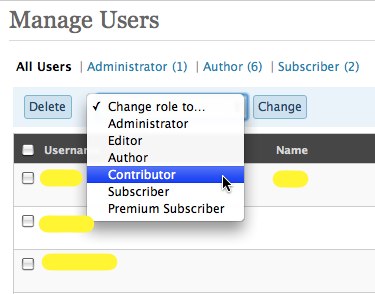
At some point if desired, you can open the blog up for others to be able to comment, and even add students as “contributors” who can write posts but their posts have to be approved by an editor. In our litigious U.S. society I encourage all school personnel setting up a blog to be careful and maintain some level of moderation control over content that is posted. It is very interesting to compare differences between blogging environments in Canada, Australia, New Zealand, and other countries compared to the United States. My observation is that the environment can be more open in other countries, due largely to differences in how litigious the society is. I’m not condoning this aspect of U.S. society at this point, but just pointing out it is real and no one wants to have a blogging project “blow up” with a bad incident. WordPress under the “Users” tab lets you assign different access rights. You’d want to set up teachers as “authors, and students (at some point) as “contributors.” Alternatively you might consider making all teachers “editors” on the blog, but granting those more expansive access rights to teachers unfamiliar with WordPress and blogging (which is probably 99% of the teacher population) may not be a great idea. It’s safer to setup all teachers as authors (who can directly publish to the site without moderation) and then have a more limited group setup as editors and administrators. Only administrators are able to moderate comments.
One thing to note is that WordPress is setup for each user to have a unique email address. If students in your district don’t already have free and teacher-moderated email accounts, I’d recommend setting them up (for free) through ePals. Sue Waters has written a nice post on how to use a single GMail account to setup student blog emails, but be aware of the COPPA age restrictions in the U.S.
Be sure to configure your commenting settings in WordPress as desired. Again for U.S. schools particularly, I recommend having comments moderated to ensure you don’t have objectionable content and links posted to the blog by registered users. It is very straightforward to do this, and WordPress does provide a variety of options in terms of comment moderation. With a team blog, I highly recommend you have multiple teachers setup as administrators so comments can be regularly moderated.

I recommend WordPress because as a fantastic open source blogging platform I think it offers the greatest degree of flexibility, customizability, and scalability for school blogging projects. Your district can self-host a WordPress blog on your existing servers, of course, but you’ll need to have IT support staff with at last basic comfort levels with mySQL and PHP. I would recommend going with an ISP like those I’ve linked above, if your district policy permits content to be hosted off your official servers, because you can get great commercial support service for your site at a very reasonable cost. By hosting your blog on your own unique domain, you should be able to get the entire domain “whitelisted” on your school’s content filter to permit access. If your school blog is on a subdomain of your main school site, of course it should be accessible in your school/district. With the other options I’ll address below, you may run into more issues/problems with content filtering. Having your own registered domain for your school blogs is the way to go, in my view, but again you need to make sure you check with your local board policies to ensure this is permitted. (If a group of teachers in my students’ home school district in Oklahoma were to attempt a setup like this, I think officially they would either be shot at dawn or burned at the stake by the flagpole after the 3 pm bell. Make sure your formal school blogging activities have the blessing and approval of your campus administration as well as your district’s IT department to avoid consequences like these.)
OPTION 2: MANAGED WORDPRESS BLOG
I am a big fan of WordPress, so my second recommendation (if you don’t want to self-host as described above) is to go with WordPress but get more assistance in the hosting and configuration of your blog. Edublogs provides free blogs for teachers and students, but I don’t think they have a domain for teacher team blogs. Perhaps you could set up a team blog as a single teacher blog on EduBlogs. I bet you can. Support blogging has lots of links for teacher blogs as well as other education blogs, but I don’t think it currently has a category for teacher-team blogs. Instead of Edublogs, you could setup a teacher team blog with WordPress.com. With WordPress.com, however, you are going to run into the issue that in some cases to unblock your WordPress blog sub-domain your IT administrator or district content filter manager may say they have to open ALL of wordpress.com on the content filter and that would open up children in the district to objectionable / offensive content.
If you get this answer, it is time to get a new content filtering solution for your school, after investigating further to see if that is REALLY the case. I know of cases where teachers have been told (in the context of our Celebrate Oklahoma Voices learning community on Ning) that it was NOT possible to simply whitelist that subdomain, when it fact it WAS possible but the IT person in the district didn’t want to admit they didn’t know how to do that. Again, this is why option #1 above is the best choice if you can do it. (You just whitelist the entire domain.)
WordPress.com sites ARE WordPress sites, but they have some limits that may frustrate you at some point. You don’t have direct FTP upload access to the site (as far as I know) so that limits what you can do with themes and plug-ins. You also may run into trouble entering some embed codes and javascripts for sidebar elements and badges. Still, it IS “WordPress” and it will support the multi-user functionality I described above.
OPTION 3: BLOGGER
Darren Kuropatwa has used Blogger sites with his math classes in Winnipeg for several years with great success. Blogger CAN work very well for team blogs, and has the benefit of Google handling your user account management for you. COPPA applies here, however, and legally your students under age 13 will not be able to get their own Google Accounts in the United States (as far as I know) and therefore this isn’t a good option if you’re going to want elementary students at some point to have an account on your blog.
For all blogging options, I recommend NOT having “anonymous” commenting enabled. Accountability is important, people often act differently when they perceive they are accountable for their actions.
Miguel Guhlin is a great resource on this question of how to setup teacher and student blogs, and I commend his wiki site “Creating the Walled Garden: Setting Up Web 2.0 Apps on School District Servers” to you in this context. (I’m not just recommending that site because Miguel quoted me at the top, either!)
ADDITION: Miguel corrected in his post “Edublogging Solutions” the links above with his newer resources “Walled Garden Apps that use PHP/MySQL backend” and “Walled Garden Apps that DO NOT use MySQL backend but do use PHP.”
Overall, I am a big fan of server-based blogging tools which provide contributors as well as consumers with web-based access to the blog on any Internet-connected computer. I do love iLife on the Mac, but as a client-side application iWeb is much more limited and less powerful than blogs which use platforms like WordPress or Blogger. I know Miguel is a huge client-side blog application fan (using Thingamablog) as is Kevin Honeycutt who uses iWeb. Both these educators create and produce wonderful educational content with their respective tools, but I stand by my recommendation for a server-based blogging platform for the reasons I’ve outlined here. For a teacher team blog, really you don’t have a choice, because it would be ridiculous for all your teachers to use the same computer to do all their blogging.
You also want a blogging platform that has VERY effective and robust anti-spam commenting functionality. Just like email spam, blog comment spam is prolific and can be nasty. Besides a cyberbullying incident happening on your school blog, the second worst-cast scenario is probably having offensive comment spam posted there. We’ve had lots of trouble in the past year on both the Google ITM blog (which is unfortunately still down as a domain, for some reason) as well as the TechLearning blog with blog spam. I use the free plugin Akismet on my own WordPress blog, which handles most blog spam and comes pre-loaded in default WordPress installations, as well as the free plug-ins Comment Timeout and Simple Trackback Validation. An updated list of the WordPress plug-ins I use is on my blog “about” page.
Hopefully that is helpful. I haven’t updated these resources in many months, but I do have additional links and resources related to educational blogging on my wiki page “Safe Classroom Blogging to Improve Student Writing.”
Technorati Tags:
teacher, school, blog, blogging, wordpress, blogger, thingamablog, ilife, iweb
If you enjoyed this post and found it useful, subscribe to Wes’ free newsletter. Check out Wes’ video tutorial library, “Playing with Media.” Information about more ways to learn with Dr. Wesley Fryer are available on wesfryer.com/after.
On this day..
- Indeed You Are Powerful – Digital Screen – 2015
- Furniture Quest for a Collaborative Classroom – 2015
- Other People’s Photos Showing Up in my TwitPic Photo Stream – 2011
- Reading the Fine Print: Considering Different eBook Publishing Options for the iBookstore – 2011
- Diigo now supports screenshots – 2010
- Let’s brainstorm ideas for Storychasers – 2008
- links for 2008-07-25 – 2008
- Will the 4th screen bring us together? – 2008
- Beware the dangers of multi-tasking – 2007
- Options for podcast publishing and web feed creation – 2007
Comments
20 responses to “How can our school set up a team blog for teachers?”
Wes,
I cannot thank you enough for the thoroughness of your response to my question re: teacher blogging. Thank you! Thank you! Thank you! The guidance you provided will empower our ICT leadership team to make an informed decision for Howe Public Schools. We are excited to tread these new waters in education 2.0 and introduce our teachers, students, and community to the learning power harnessed in the blogosphere! The power that I witnessed first hand during my participation in BLC 2008!!
Thanks again! I will keep you up to date on our “blogging” adventures at HPS.
Tammy Parks
Broadcast Journalism Teacher
Instructional and Communication Technology Facilitator
Howe Public Schools
Howe, OK
A ning at ning.com might be another option. A ning can be set up with specific registration, security, privacy settings.
Duplication is the key. If you start using a solution such as edublogs.org or ning.com in one way, it is best if you can continue to utilize the technology solution without having to worry about the costs associated.
Good luck.
Keep learning and sharing,
chris
Wes,
This is a great review! I am getting ready to look at alternate ways to blog with different age groups in our district and this was very helpful.
You don’t mention a ning as an option. A ning would allow you the privacy you seek, an interconnected network of teachers–each with his/her own blog, and the ability to form groups and a discussion forum. Set-up is quick and easy. It’s worth considering.
Chris: I agree that a Ning site can be a GREAT option, since it can be made entirely private, read-only, or moderated… The problem I addressed with content filtering can be an issue with Ning, however, just as it can be with blogger and wordpress.com. If you can work out the access issues with your IT department, Ning can be great.
One drawback of using a Ning site, however, is that it does not use the same linkback functionality as blogs, which notify each other when references are made to other posts. I am perhaps not surprisingly a rather ardent blog fan and evangelist, so while the Ning offers nice additional features, I think the focus on writing and a chronology of posts which a blog offers is really great. Ning does offer feeds, but is really more of a learning community environment than strictly a blogging option.
I’d like to re-emphasize the point that school districts SHOULD use a content filtering system which permits subdomains to be whitelisted. Not all do, of course, but ideally that should be the case. I think the article I recently wrote for the TCEA TechEdge on content filtering should be coming out soon, I need to post that article online and have not done so yet.
Glad this info was helpful to you as well, Cheryl! 🙂
[…] How can our school set up a team blog for teachers? […]
Another very valuable post for teachers.
I am going to use “Blog This” and make some observations on my blog, which I am trying to sustain through regular links to the many stimulating posts of A List edubloggers and the addition of my personal reflections.
For teachers, I would recommend Blogger mainly because it links with all the other wonderful google apps.
Ning as suggested above it also a worthwhile option.
Elaine
It’s funny you should write about this. When people bring up blogs, I always wonder why they don’t bring up WordPress MU. It’s a much better solution in situations such as these. So a couple of days ago, I decided I would take it upon myself to create a WPMU tutorial site for schools and show everybody how easy it is to put one up.
Woah, was I wrong Where WordPress can be installed in many websites with just a couple clicks, it took 12 long steps to get WPMU installed. You can see what I’ve got so far – http://tinyurl.com/5wbk8u – but I’m a little discouraged with the project at the moment. It’ll probably scare more people off of blogs than it’ll help.
There’s two WordPress plugins that might be helpful in the situations you describe: (1) GT Post Approval – which holds published entries by authors until an administrator approves them, and (2) Registered Users Only – which will allow only logged in users to view a particular blog
Dean: The last report I heard on WordPress MU was from Miguel Guhlin, and it was also very negative. I agree that in theory WordPress MU should be good for supporting multiple student blogs, but in this post I was more focusing on the idea of setting up a team blog. You might give Lyceum a try instead of WordPress MU, it is touted as “a multi-blog derivative of WordPress, suitable for installations with 2 or 2,000,000 blogs!” I have not directly spoken/communicated to/with any educators who have used Lyceum tho.
Hi Wes,
This is something we’ve tackled in our own district and our solution was to go with Blogger for a few reasons. The first is that though it’s great to have a walled garden for students while they are in school, I’ve always hated the idea of all their work being inaccessible to them when they leave. Blogger allows them to manage their access and if later they want to open it to the public they can. Plus with a Blogger account, students and teachers automatically have dozens of other services available to them. (Never underestimate the resistance to yet one more login 😉 and finally, for the 13 year old issue, we sent home forms for parents. Most were impressed their kids were going to have a blog.
Other good option is rSitez. http://www.rsitez.com
It’s similar to Ning but their groups features and blogs are better for your purpose. It’s paid service but cheaper
than Ning when you compare closely. With them you control advertisement and also you can add membership payments so is more complete.
I was going to recommend a Ning type of setup for teachers that is easy to edit and manage. Gaggle.net. There is another blog that allows interaction and is easy to setup for students or teachers and is called Say ____. I can’t remember the last part and couldn’t find it yet in a quick search but I can find it if anyone is interested. You send class lists and each student or teacher has a specific username that has restrictions according to the level of the user. Might want to check those out in addition to the setup of a Ning.
Sorry, Wes, I misread this post a little. I guess I have WordPress MU on the brain after working on the instructions for it. (And actually, I’ve had good luck with it myself. It’s just trying to describe how to install it in a simple way that’s the problem.) Thanks for the suggestion.
np Dean – I’m glad to hear more about WordPress MU and that you’ve had good experiences. Did you or have you considered Lyceum instead of WordPress MU?
I remember looking at Lyceum’s website when I was investigating different options last year, but that’s as far as I went with it. I’m not sure if I was confused by the installation instructions or I didn’t see enough there to convince me that was the right choice. I thinking I just might give it a try, though, at least for personal testing.
For our school, I’m probably going to stick with WPMU but I’ve submitted a proposal to do a session on blogging in the writing process for a local technology conference, and I’m looking for some different options that schools/teachers would be able to set up. I’ve got WordPress MU and Blogmeister so far. Maybe that’s enough, but if there’s some more good alternatives out there, I’d like to include them.
Howdy, a companion post with up to date Walled Garden links–with MySQL dbase backend and without–and a graphic organizer here:
http://tinyurl.com/5v383o
A WordPress installation seems like the best way to go if you have your own server. Otherwise, get an Edublogs.org site.
The problem I see with a hosted solution is that you have to learn PHP/MySQL and CSS and stuff. If you have time, inclination, great. Otherwise, the Edublogs.org solution seems the better way to go…and I think it tops Blogspot/blogger/WordPress.com solutions handily since these commercial blogs are blocked in schools. You wouldn’t want to lose your potential audience from the get-go, would you?
Best wishes,
Miguel Guhlin
Around the Corner-MGuhlin.net
http://mguhlin.net
In regards to Ning.com, 4 questions I have to ask include:
1) How easy is it to backup a Ning you’ve created if you decide to walk away from Ning?
2) How easy is it for you to setup a Ning on your own server if you do decide to walk away?
3) Does Ning have an education only location that at least has the obligatory “.org” label so that it won’t be blocked, unlike the “ning.com” that is in some districts?
4) How many administrators can you setup on a Ning?
Otherwise, a Ning community is nice.
Take care,
Miguel
[…] is a GREAT question, and relates closely to some questions Miguel Guhlin asked in response to a post I shared titled “How can our school set up a team blog for […]
There are a couple of ways to do this with edublogs.org. You can have one blog, with multiple users that have different permissions. Sue Waters explains this here; http://tinyurl.com/684p4b
You can also have multiple blogs and use blogrolls and RSS to link them together. Edublogs supports the aggr rss plugin, which I’ve used from time to time on posts and pages, AND rss widgets for the sidebar of a blog.
[…] How can our school set up a team blog for teachers? » Moving at the Speed of Creativity […]