
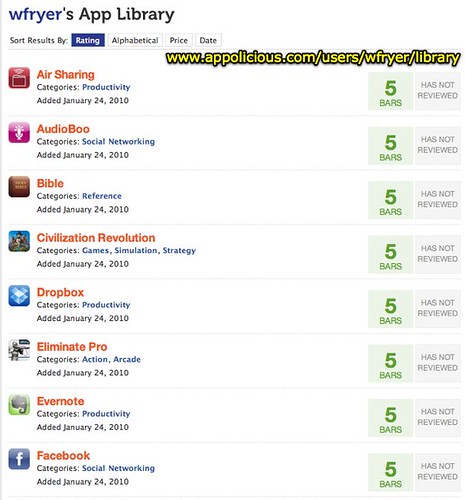
Thanks to some just-in-time Twitter assistance from Lucy Gray this evening, I was able to use the Appolicious App Library Builder to automatically build a sharable and ratable list of our family’s installed iPhone Applications for FREE. Previously I’ve taken screenshots within iTunes using Skitch and saved them to a Google Site, but Appolicious is MUCH better since it allows you to rate apps and makes recommendations, similar to the way NetFlix works. When you view someone’s App library on Appolicious, apps are sorted by how the user ranked them (5 bars is the best) and then alphabetically.
The real key to getting this working was finding my “iTunes App Library.” Per Lucy’s directions, I navigated in my iTunes library (path on a Mac: Users, Username, Music) and pointed to the folder “Mobile Applications,” as shown in the screenshot below.
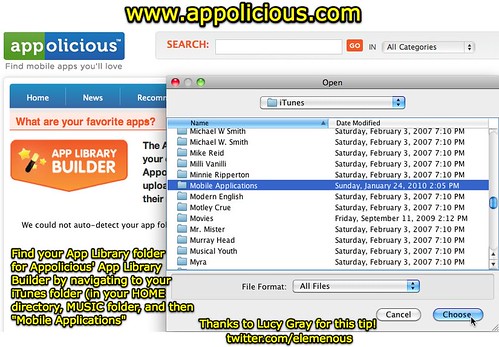
The main problem with sharing this screenshot with you is now you’re probably wondering how I could have songs by Mr. Mister, Motley Crue, Michael W. Smith, and Myra, all in the same iTunes library! Well, our family’s eclectic music tastes will have to be the topic of another post….. 🙂
Give Appolicious a try, and if you do please share your apps with me so I can check out your picks!!
Technorati Tags:
app, apple, apps, iphone, itunes, share, sharing, appolicious
If you enjoyed this post and found it useful, subscribe to Wes’ free newsletter. Check out Wes’ video tutorial library, “Playing with Media.” Information about more ways to learn with Dr. Wesley Fryer are available on wesfryer.com/after.
On this day..
- Benefits of Video Feedback – 2022
- Design Thinking Takeaways from Our #k12onlineconf Panel – 2017
- Save YouTube Videos to iPad Camera Roll for Green Screen Compositing – 2016
- Make a Song with Sounds from Your Kitchen on an iPad – 2012
- Transition to Common Core Standards by Jan Hoegh (2 of 2) – 2012
- Transition to Common Core Standards by Jan Hoegh (1 of 2) – 2012
- Manage Podcasts WITHOUT an iTunes Sync Using Podcaster – 2011
- Oklahoma’s New K12 Educational Leader (Janet Barresi) Models Social Media Use – 2011
- Offline, mobile-friendly webpages on an iPhone or iPod Touch – 2010
- From One Computer Lab to 1:1 – Best Practices of Technology Integration by Katie Bader and Diane Bilcer – 2010
Comments
2 responses to “Find your iTunes App Library on Appolicious and Share your iPhone Apps”
[…] Check out Wes Fryer’s post Find your iTunes App Library on Appolicious and Share your iPhone Apps […]
Wesley, thank you for checking out Appolicious! Glad you enjoy.
Best,
Shara
Shara Karasic
http://www.appolicious.com
Twitter: appolicious
Create curated app list here: http://www.appolicious.com/curated-apps/featured