
Addition 8/14/2011: CloudBrowse is no longer free, it was at the time I wrote this post initially. It’s now a $3 app.
If there’s one thing my children have lamented more than any other when it comes to iPhone, iPod Touch, and iPad technologies, it’s the lack of support for Adobe’s Flash technology. Club Penguin and Webkinz continue to be some of their favorite websites, but both of them are built almost entirely with Flash. Steve Jobs made it clear last month Apple does not plan to support Flash (a proprietary Adobe format) and instead wants developers to embrace HTML5, CSS and JavaScript. While Apple may not support Flash at this point on the iPhone (and may never support it, despite possible lawsuits and FCC inquiries) VNC (virtual network computing) technologies DO make it possible to access flash-based websites on an iPhone, iPod Touch or iPad today. The screenshot below shows a scene from Webkinz running on my iPad, which I captured this morning when my six year old was playing on it.

Thanks to a tweet from Dean Shareski, a phone call from Karen Montgomery, and a recent post on iPhoneInCanada, I learned today about the free, Apple-approved / App Store downloadable program “Cloud Browse.” Cloud Browse (direct App Store link) uses VNC technology to let anyone run a full, desktop version of the FireFox web browser on their Apple mobile device.
After installing the free app, upon launching users are connected to a virtualized version of FireFox running somewhere else on planet earth. The company which makes Cloud Browse, AlwaysOn Technologies, is Boston-based, but in today’s networked world it’s anyone’s guess where their actual servers “live.” By default Cloud Browse users are connected via an anonymous account, and can immediately click the “web” button at the bottom of the window to enter a website address / URL.
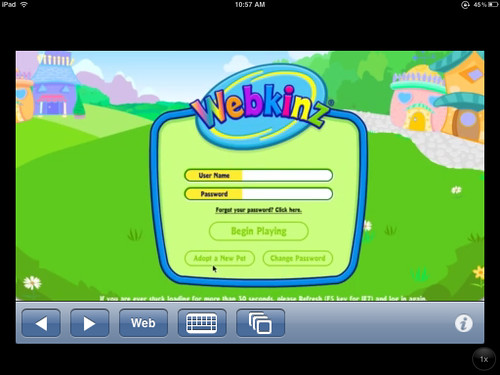
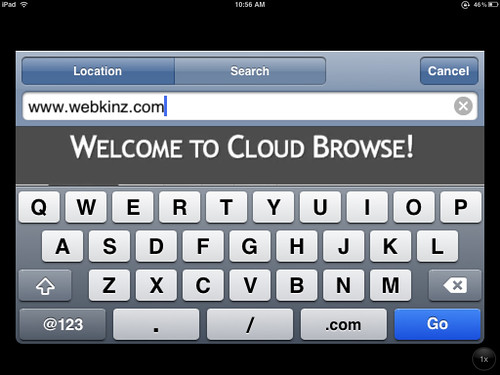
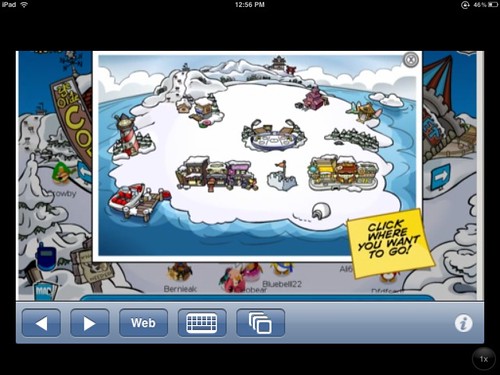
The performance of Cloud Browse was pretty snappy for me today over home wifi. This VNC solution does support playing Club Penguin, as well as accessing flash-based websites like VoiceThread for playback purposes.


There is NOT virtual microphone support with Cloud Browse, however, so it is NOT possible to actually record audio for a new VoiceThread. You can leave text comments, however, which is certainly better than zero access to VoiceThread through mobile Safari currently.

Within the application, by clicking the information “i” in the lower right corner, a preferences window can be accessed. In addition to providing tutorials about touch-technology gestures which the application supports, users can provide an email address and password to “save sessions” for later logins.
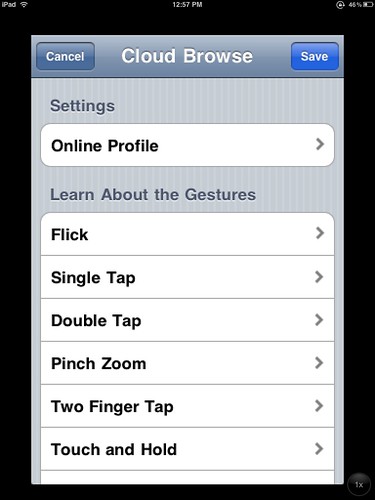
This is probably a good idea, since connections can be lost unexpectedly. If session credentials are not used, everything which was opened and done in the previous session will be lost.
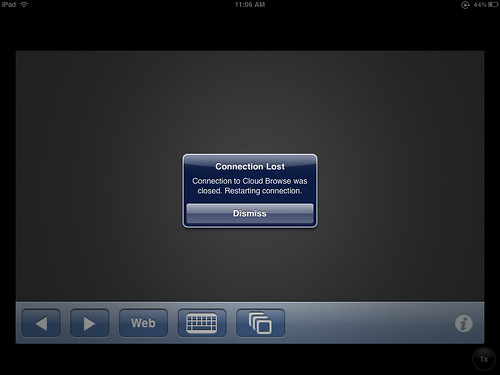
Cloud Browse only has an iPhone / iPod Touch version available currently, and while it DOES function fine on an iPad users have to double the screen size (2x) for full-screen viewing. It’s not perfect, it’s pretty pixelated, and it certainly doesn’t look as gorgeous as most iPad-native applications do running fullscreen. It’s the first application I’ve ever used which permits access to Flash-based websites on an Apple mobile device, however, and I think it’s a harbinger of things to come.
VNC technology running on iPads, iPhones, and iPod Touches brings up a host of issues.
- Will people be careful to verify the integrity of companies like AlwaysOn Technologies before entering secure login credentials into a VNC window? (Hopefully all VNC-approved apps like Cloud Browse are fully vetted by Apple and their owners can be trusted to NOT skim website userids/passwords, but that type of identity theft is rampant and always a possibility.)
- Will virtualized browser and other application access like this provide scalable, secure ways for schools and other organizations to provide students with access to licensed / copyrighted materials? (Imagine having your own school iPad / iPod Touch application, which not only provides access to textual content but also to licensed, rich media libraries like Discovery Streaming after users login with their access credentials?)
- Since this type of access provides anonymizing / proxy-based access to websites, what does this mean for online accountability? (Any websites visited/used with an application like this are not saved in a local browser history, or recorded on a local router log.)
What other implications for this type of VNC technology do you see for schools as well as individuals / families?
I know one for sure, in our family… On long car trips with shared 3G wireless data access, it’s going to mean yet ANOTHER reason no one can say, “I’m bored Dad!”
Technorati Tags:
apple, cloud, ipad, iphone, ipod, ipodtouch, touch, flash, adobe, vnc, browse, cloudbrowse
If you enjoyed this post and found it useful, subscribe to Wes’ free newsletter. Check out Wes’ video tutorial library, “Playing with Media.” Information about more ways to learn with Dr. Wesley Fryer are available on wesfryer.com/after.
On this day..
- Storychasing Graduation – 2023
- Essential Technology Support Staff Skills and Characteristics – 2019
- 12 Gigs in 3 Minutes – 2014
- Recent College Grads Wanted More Tech Classes – 2012
- Advice for a College Graduate – 2012
- From a church talent show to the Ellen DeGeneres Show: YouTube fame for an Edmond 6th grader – 2010
- Ideas on Human Motivation shared via StopMotion and Creative Drawing – 2010
- Welcome to the Social Media Revolution (video) – 2010
- Never underestimate the value of becoming a published author in 1st grade – 2010
- The lure of iReporter fame encourages dangerous tornado chasing – 2009
Comments
22 responses to “Access Flash websites on an iPhone, iPad or iPod Touch (including Webkinz and Club Penguin)”
Oh no – one of the reasons I ordered an iPad (still no sign of them in the wild up here in Canada) was because my children wouldn’t be able to play Webkinz. They can have the laptop while I browse on the iPad. Let’s just keep this our secret, OK? 🙂
*Clapping* Great find Wes! I am currently using Starfall on my iPad. Very excited about this app! We are implementing a 1 to 1 iPad pilot program in 1st and 5th grade next year and this app will make it that much better.
Incredible! Thanks for bringing this to our attention! One of the teachers in my building is piloting iPads in our District- this really helps. (and yeah, my kiddos will be thrilled that they can play Webkinz on my iPod now)
Julie: I’m sure this isn’t something that will be a secret to your kids, but it may NOT be something you’ll actually want to install on their iPads. Keep in mind issue #3 which I raised above: Internet access via “Cloud Browse” is entirely unfiltered and untracked. I’m an advocate for balanced content filtering in schools as well as homes, not draconian filtering– and I’m definitely a fan of helping “kids become the filter.” That’s said, however, there are a host of implications to the school providing access to this app on an iPad, and I’d encourage you as well as others at your school to thoroughly explore those. Basically, this app gives anyone who uses it direct access to a proxy server which bypasses all your school’s content filters. That’s an important issue to discuss not only with district administrators but also with parents. We DO need to provide students with opportunities to learn how to responsibly navigate an unfiltered web, but we also have legal obligations to provide at least a basic level of content filtering in our US schools receiving eRate funding. These are all issues this app’s functionality raises.
Great find! Thank you.
[…] Access Flash websites on an iPhone, iPad or iPod Touch (including Webkinz and Club Penguin) «… — RT @wfryer: New post: Access Flash websites on an iPhone, iPad or iPod Touch (including Webkinz and Club Penguin) http://bit.ly/cg7VvI | need_to_retag via:packrati.us […]
Looks promising Wes! However, besides being unfiltered, one comment left on the app info page stated,
“All it does is open a VPN to another machine. Be very careful folks, all the pages that are being surfed are available for others to see in the URL. Don’t save your private info on the browser. Watch your backs. It’s tempting but how desperate are you for flash?”
So, should users be concerned about saving emails and login info for sessions?
Wesley,
Thanks for sharing this resource. I have seen a lack of Flash support as a major drawback to the iPad for education. While there are other means of supporting video on the iPad, there is no alternative to Flash for all of the educational online games/activities/manipulatives used in the classroom. It is encouraging that there is a way for schools to access Flash on the ipad. I hope development progresses in this direction to find a solution that is high quality and secure.
This sounds like an unsecured and potentially risky workaround to me. Your point about trusting these VNC providers. I’m waiting to put my money down on a product that fully supports the Web – Flash and all.
http://www.adobe.com/devnet/flashplayer/articles/mobile_demos_fp10.1.html
I’m with Charlene on this one. I don’t trust Cloud Browse and passed on it myself. However, there are plenty of other VNC apps out there. I splurged and bought a copy of LogMeIn ignition (30 dollars) which allows me to connect to any Mac or PC and control it as if I was sitting at the computer. I can’t recommend it more highly. Works like a charm, and has a universal app which works just as well from an iPhone as it does the iPad. And since you’re connecting to your own computer, it’s SECURE.
There are plenty of free solutions out there as well, with various strengths and weaknesses. But I’m pretty darn happy with Ignition and would recommend it to anybody that is worried about what an iPad WON’T do.
Hi, I’ve got an Ipod touch and I just downloaded this amazing app!
But I’ve got a BIG problem: Everytime I start/open that app it begins to load the site for maybe 20 seconds and then it always says:
CONNECTION LOST!!
What can I do?? Please, I need help!!! 🙁
I have had problems with the app being too busy to accept more anonymous users. Not sure if this will be fixed/addressed or not.
You could have a local connectivity issue with your wifi access point. You might try the app in other places on different wifi networks, and see if the same thing happens. If so, you might try entering login credentials for the site and see if that makes a difference. Not sure if it will or not, but give it a try. Also try to use the app/site at different times of the day. Internet use in North America peaks in the afternoon, I think, so try earlier in the day and see if that makes a difference.
Hey Wesley!
Thanks for your tip…I didn’t try it yet, but it sounds good…
I already tried to use the app to every Time of the day…:(
I hope it will function, because I don’t like to use my Computer every time!
Do you know when to use the internet in Europe is best, too?
I ask that, cause I live in Germany near Denmark..!
However… Thanks!! We’ll see if it helps me!
Don’t worry, Rob. You’ve still got some level of peace – just exit the app without saving the session and poof, the next time you load the app it’ll be like they never logged in, lol.
This app is only avaliable on the US app store 🙁
That was a big disapoitnemt
Yea but cloud browse cost money!!!! 🙁
So r u saying cloud browse has a filter because my mom won’t let me get it because she thinks It does not have a filter because I play club penguin also and I would love to play on my iPod touch. Ps I am 11 years old
No, cloud browse does NOT have a filter.
Cloud browse is not free
Cloud browse is not free
You’re right, it’s now a commercial app. At the time I wrote this post it was free. I’ll update my post, noting that change.
It costs money!!!!!!!!