
My mom uses an older, 2nd generation iPod Touch to read books with the Kindle app, and in the past liked to view her MobileMe calendar on it. Since upgrading to the “new MobileMe” calendar,” however, she was not able to view her calendar any more on the device. As an older iPod Touch, the newest iOS version it can run is 3.1.3, and the “new MobileMe Calendar” only supports iOS 4.1 and newer on the iPod Touch. In this post I’ll share some of the things I’ve learned about the new MobileMe calendar and how I worked around the iOS version limitations to provide read-only calendar access for her on an older iPod Touch running iOS 3.1.3.
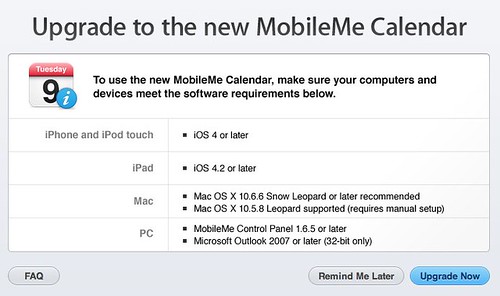
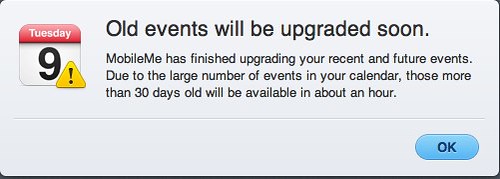
In researching this issue, I found the Apple Support article, “MobileMe: Frequently Asked Questions about the new MobileMe Calendar” helpful, along with “Troubleshooting new MobileMe Calendar issues.” I initially thought this was a sync issue so I restored the iPod Touch to its default software and configuration. The older iPod Touch (iOS 3.1.3) was still able to sync MobileMe contacts fine, but not calendars.
The old MobileMe calendar sharing settings used a “webcal://” address which was relatively easy to remember and share. It included the respective MobileMe username and shared calendar name:
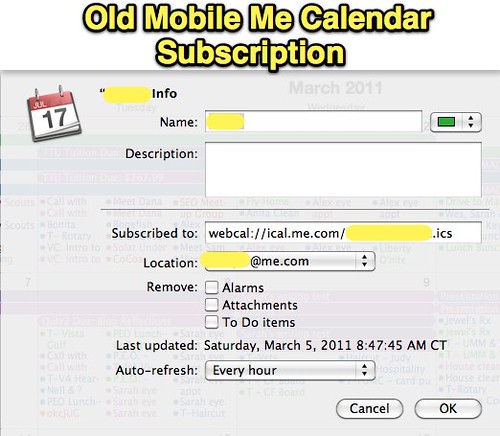
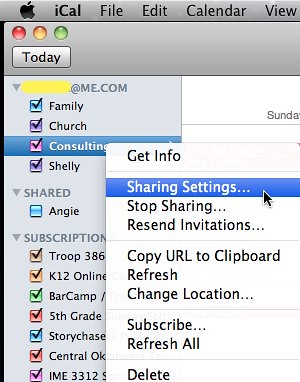
The new MobileMe calendar sharing settings are different, however, and appear to require a new setup. (Devices which previously accessed a MobileMe calendar need to be reconfigured.) Rather than being stored locally on your computer and THEN synced to the web / MobileMe, the new MobileMe calendar “lives” on the web and is accessed via different devices. These can include desktop computers and laptops running iCal, other compatible calendar programs, web browsers (for publicly shared MobileMe calendars) and iOS devices (iPads, iPhones and iPod Touches). After upgrading to the “new MobileMe calendar,” I created new sharing settings for a calendar in iCal by control-clicking (or right clicking) the calendar name under my MobileMe account and then choosing SHARING SETTINGS.
MobileMe calendars can still be shared privately with other MobileMe members. That email does not include a “copiable” web address to the calendar, however, but redirects to MobileMe where the subscription is confirmed.
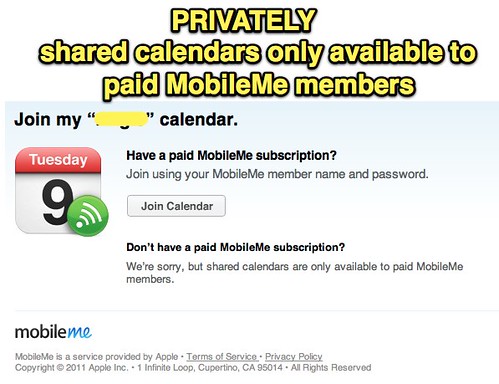
Privately shared MobileMe calendars cannot (as far as I could tell) be accessed via Calendar on an older iPod Touch running iOS 3.1.3. To do be accessed on an older iOS device, a new MobileMe calendar needs to be shared PUBLICLY.
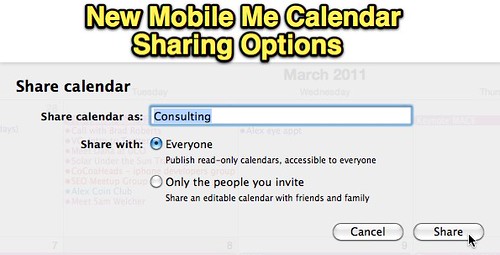
That publicly accessible address can then be emailed to an account accessible on the older iPod Touch, and then copied so it can be pasted into the iOS settings under:
– Mail, Contacts, Calendars
– Add Account
– Other
– Add Subscribed Calendar
– Server (this is where you paste the address iCal creates)
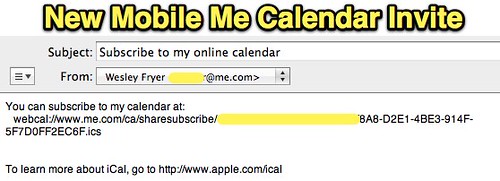
By configuring a NEW MobileMe Calendar for public sharing and using the NEW server address (which starts with “webcal://www.me.com/ca/sharesubscribe/….” an older iOS device running 3.1.3 software can access the calendar in a READ ONLY format. This is what my mom wants to do on her older iPod Touch, so we’re both quite pleased this workaround is possible.
While the move to a new calendar format for MobileMe can be a hassle, especially when using older iOS devices incapable of running 4.0 software, the change comes with a lot of benefits. According to the MobileMe FAQ:
As part of the new MobileMe Calendar, your data is moved to a new calendar service, which supports the CalDAV standard. CalDAV is an industry-standard calendar protocol that works with the latest Apple devices.
From what I’ve read, it sounds like this new calendar standard will provide for greater interoperability for MobileMe calendars as well as more features. More information about CalDAV is available from WikiPedia.
I’ve read several articles lately on Mac rumor sites about Apple’s 500,000 square foot server farm in North Carolina, allegedly built at a cost of over $1 billion. Some sites have predicted Apple will make MobileMe a free service for everyone, but I tend to think predictions of “unlimited downloads of purchased iTunes music” (like iOS app purchasers now enjoy for all apps) sound most credible. I (like many others, I’d guess) hoped we’d hear these announcements during the March 2nd iPad2 keynote. We didn’t, so maybe we’ll get that news this summer with a new iPhone model. Something new and exciting with cloud-based services is clearly in the works from Apple, and I’m sure it will be good news for Apple affectionados like me. 🙂
Technorati Tags:
ipod, mobile, touch, calendar, compatible, configure, run
If you enjoyed this post and found it useful, subscribe to Wes’ free newsletter. Check out Wes’ video tutorial library, “Playing with Media.” Information about more ways to learn with Dr. Wesley Fryer are available on wesfryer.com/after.
On this day..
- Code as Poetry in 4th Grade Scratch Club – 2018
- 2 Challenges: With STEM & iPads – 2014
- Growing Nimble Thinkers for the Creative Economy by Deborah Morrison and Glenn Griffin – 2013
- Cage-Busting Leadership by Rick Hess – 2013
- Options for Posting by Email (RIP Posterous) – 2013
- Green Screen Photo Effects On The Cheap – 2012
- K12 Panel at the 2012 Heartland eLearning Conference – 2012
- Why is cloud computing significant for college faculty? – 2012
- A Voice of Reason on US Education Policy – 2011
- The Power of Media Advertising: Ads Worth Spreading from TED – 2011
Comments
4 responses to “Accessing new MobileMe Calendars on an older iOS 3.1.3 iPod Touch”
Here’s a WAY better and easier way to achieve this, so that your old calendars can by synced on an older device with the calendar upgrade, just like before the upgrade!
I have a regular old 3G iPhone with version iOS 3.1.3 software. If you would like to keep syncing your old iOS device and would like to use the new MobileMe Calendar you can do so without much trouble.
First, go and upgrade your Me.com calendar to the new CalDAV. This will break syncing to your old iOS device.
Next, on your iOS device go into the Settings app and select ‘Mail, Contacts, and Calendars.’
Select ‘Add Account’ and then pick ‘Other.’ Under the Calendars section, select ‘Add CalDAV Account.’ The Server you need to enter is: cal.me.com. The username and password are your Me.com credentials. Then give the account whatever description you feel appropriate.
Once the account is verified by your device, you will now be syncing your data with Me.com again. If you go look a the calendar app, you will see that everything is in duplicate. To correct this you just need to go back into the Settings app and select your Me.com account. In there you can turn off the Calendars syncing. An options panel will pop up asking what you want to do with the data that has already been synced to the device. Just select to remove it from the device and you should be all set. Your calendar syncing should work as it did before the upgrade to the new calendar on Me.com.
Aweseome, thanks for the tip and instructions, Pete!
Thanks to Petewildermuth for your quick tip for making my 3G iPhone with version iOS 3.1.3 work with the new MobileMe calendar – it simply works.
Thanks for the above tip! I have been messing with getting my iCal Mobile Me calendars synced to my 1st Gen iPod touch for a couple of hours now and finally it worked!