
I’ve used PollEverywhere the past two weeks to take class attendance in my Technology 4 Teachers course at the University of Central Oklahoma. The first week I had everyone submit their name with a cell phone as a SMS message at the start of each class.
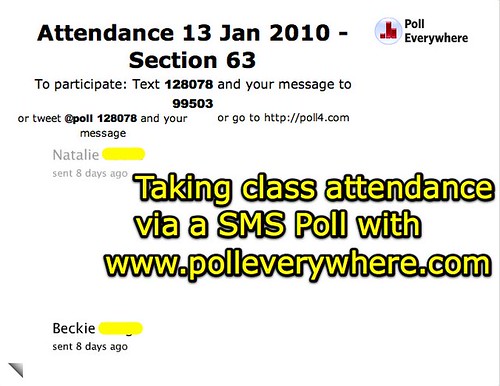
I opened the poll at the start of class, and closed it at the end. Poll Everywhere archives poll results, so if I need to go back and check attendance at some point (which is unlikely, but possible) I can always do so by logging into my account.
In the second week, I had students vote using the web browser on their computers, instead of a cell phone. (Our class meets in a computer lab, so we’re 1:1.) It was interesting that in week 1, I had several older students strongly object to the use of cell phone text messaging. (“I won’t use text messaging. The screen is just too small.”) Since everyone in our class is online in their web browser the entire class, it is easier to use a web-based polling method. As I created the open text poll in PollEverywhere, I checked the box in the right sidebar to permit web voting.
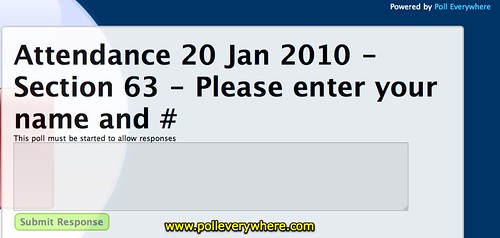
I needed to assign students a week to collaboratively write a lecture summary post on our T4T Scribes Blog, so I used our attendance poll at the start of class to do this. I would have preferred using a technological means for this, but I wasn’t sure how. I had students draw numbers on slips of paper at the start of class, and then submit the number they drew along with their name in our attendance poll. To share the link to our poll, I added it at the top of our wiki curriculum page for the week, and students accessed it from there. This was the student view of the poll:
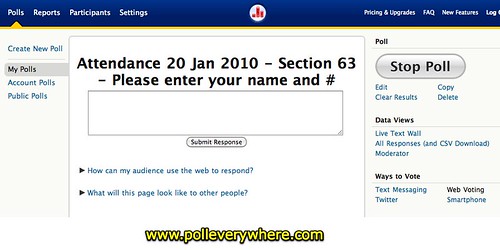
This is what the poll looked like to me, as the instructor and creator of the poll. Note the words “Web Voting” in the right sidebar are not hyperlinked, because that was the link I clicked to display this web voting version. This was the URL / link I copied and shared with students for their use.
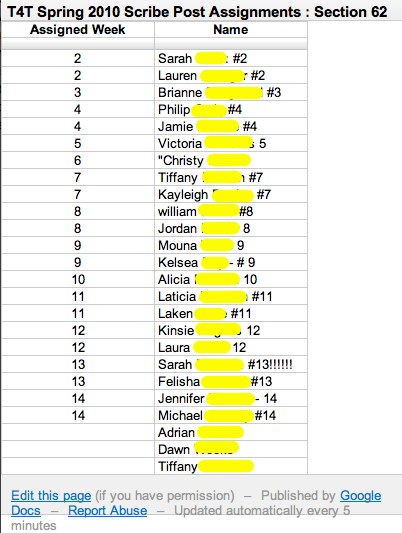
After class, I stopped the poll and clicked ALL RESPONSES (AND CSV DOWNLOAD) to download the students’ responses. I opened the CSV file in Excel, added a new column for the scribe post week the students were assigned, and copied those numbers into the column from the submitted responses. I copied those cells into a Google Spreadsheet, and shared those worksheets publicly. I linked them from a new post our T4T Scribes post, giving some additional instructions for students about this assignment.
A Google Form would have worked well for this survey as well, but I’m wanting to introduce students to the ways cell phones can be used interactively to support instruction and learning as well as web-based tools. I may switch to a Google Form later in the term, and use a different worksheet and form for successive weeks.
Have you used a polling solution to take class attendance in a 1:1 setting? What have you used, and what have your experiences been?
NOTE: It is relevant to note the following from my blog disclosure policy:
While I have not received financial renumeration from the company, I have been given a free “Presenter” level account by PollEverywhere which I use frequently here on my blog and in conference keynotes/presentations.
Technorati Tags:
class, edtech, education, poll, survey, technology, uco, attendance
Note: As of 1 Oct 2026, this is a FULL STATIC COPY of all 6,390 posts shared on this blog since 2003. Updated content and ideas from Wes Fryer are still available!
Comments
4 responses to “Taking class attendance with cell phone SMS messages and PollEverywhere”
Hi, Wes! I was wondering if you’re using any of the class management apps for iPhone/iTouch, such as Educate or Attendance or iGradr. I start a similar class on Monday night, and I’m trying to figure out a really good attendance solution.
I haven’t tried any of those, but thanks for the heads up about them! Good luck with your class that is starting. If you use one of those apps please let me know what you think and how it goes.
I watched your introductory Technology 4 Teachers class.
I am VERY proud of you to actually USE technologies that these future teacher may be using in 1, 2, or 3 years when they graduate and are certified.
I wish I had you as my tech for teachers instructor.
My mandatory teacher’s technology course was a waste. It was obvious during MANY of our presentations that a third of the class knew what was going on, but certainly NOT from the two grad students who “taught” the course.
At the high school I teach at, we have a total cell ban at the school front door. I would LOVE to do this simple attendance. How does this method prevent a student recording their attendance when they are not in the class room? His/her friend in the class could text information that they would need to record him/herself present.
Taking attendance is a great way to start using technology in the classroom to automate tasks! We used PollEverywhere in one of my entrepreneurship classes to take votes on the best business plan and I was hooked for all my professional presentations. Audience engagement is just as important in a classroom as it is in a sales meeting.
http://networkingexchangeblog.att.com/enterprise-business/use-mobile-polling-to-know-if-you%e2%80%99ve-reached-your-audience/