
I received the following question via email recently, and am posting it here along with my thoughts. I’ve been wanting to write and share about ePortfolios for several weeks, and this question has given me a good opportunity to do so. Please chime in with other suggestions and ideas!
I wonder if Moodle is a suitable platform for what I want to do?… I teach HS Physical Education and also head up the department. Here is what we want to do:
- for each of grades 9, 10, 11 and 12 will have an electronic portfolio into which students will enter goals, results, reflections etc
- the portfolio will be published by the department as a template which will be protected. There will be boxes, tables, etc where individual students can enter their own response
- the teacher will have access to the individual student portfolio so that they can monitor and comment using convenient links on the portfolio
- the portfolio will be stored on-line and will follow the student through all four years of high school
- the teacher will be able to see on one page links to all their students’ portfolios
- the teacher will also have a real-time notice board showing when students have last made submissions
Is this something that Moodle can do? Any suggestions off the top of your head?
Here’s my response:
Moodle is definitely a flexible platform, and it can be adapted for a myriad of uses as a content management system. Since you are specifically wanting to develop an online portfolio system, however, I’d recommend that you look into Mahara. Like Moodle, Mahara is open source, but it is specifically geared toward the development of electronic portfolios. Your IT department would need to install, configure and maintain your Mahara installation like they would with Moodle, or you’d need to do this with an ISP or web host. I know that Remote Learner is a company providing hosting and support for some of our Oklahoma schools using Moodle. (They are based in Virginia.) I don’t know of companies currently providing a similar service specifically for Mahara, but would guess there are some out there.
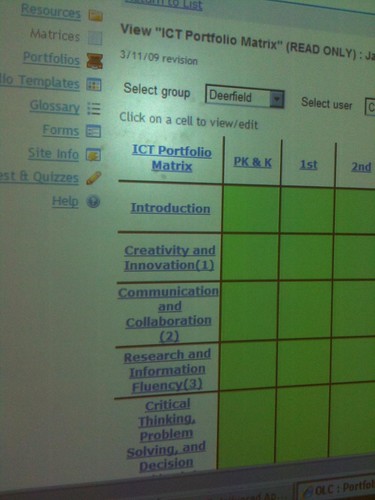
When I was in New Hampshire last month visiting Deerfield Community School, I learned a bit about the statewide pilot project their teachers are in through a grant and the State Department of Education’s Instructional Technology Division. They are using Sakai, which is billed as a more “enterprise-level” open source learning management system similar to Moodle, to develop teacher electronic portfolios as well as student portfolios specifically aligned to the ISTE National Educational Technology Standards. (NETS) These are some photos I snapped of the interactive white board during a demonstration of this Sakai-based eportfolio system shared by Deb Boisvert. Deb is the technology director / coordinator at Deerfield. Without a login guests are limited in what is visible. Their eportfolio site (linked from their school homepage) is sau53.sakaizone.org.
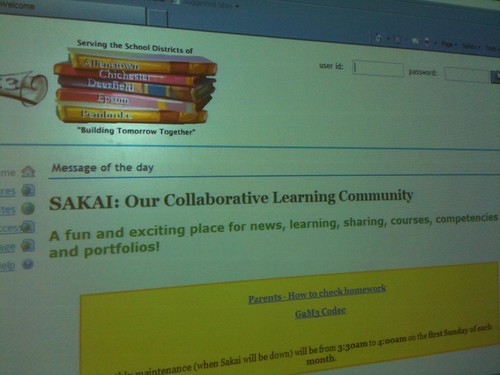
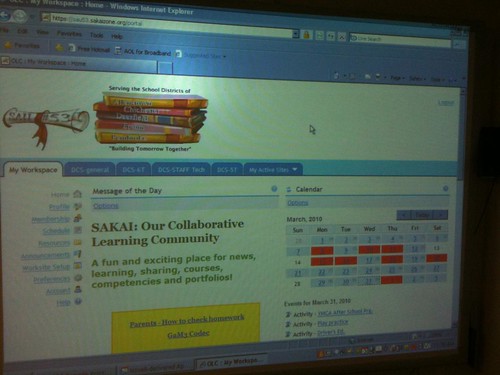
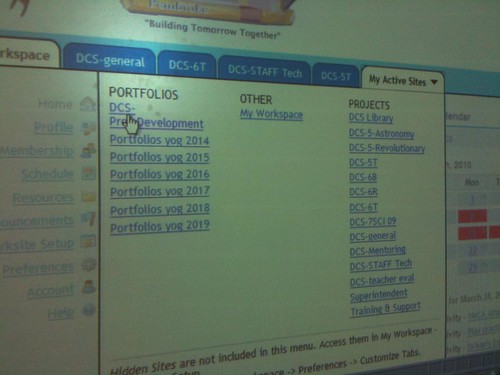
The portfolio options visible to a user depend on their assigned rights. Deerfield has organized student portfolios by graduation year.
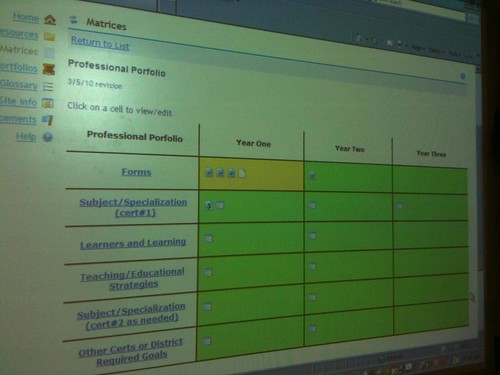
This is a view of Deb’s professional portfolio interface. As you can see, various forms are required for different phases, and columns are provided for each year the portfolio is maintained.
This is a view of a student ICT portfolio, which is aligned to the ISTE NETs.
As you can see from the publicly-accessible “features” page of the Deerfield online portfolio Sakai site, there are a LOT of available functions and features within Sakai. These are similar to Moodle, and other commercial learning management systems like BlackBoard/WebCT and Desire2Learn. A big issue, however, is if you have FUNDING, time, expertise, and support personnel to develop AND SUSTAIN your own ePortfolio system. Moodle is really configured for multi-week courses, although like Sakai it can be customized to fit other needs. Some schools (including yours, from what I learned in September during my visit) DO have IT staff members with the expertise and wherewithal to support customized, open source, server software installations. I’m thinking you all have a homegrown, custom-built content management system / learning management system. I don’t know all the politics (and those certainly come into play when teachers ask for a new CMS or new CMS functionality) but I’d really encourage you to look to Mahara first if you’re going to develop an ePortfolio system from scratch. It also may be possible for you to functionally define what you want the system to do, and have your IT department built it within your existing learning management system. That may be politically and technically the best path forward for you. I’m not sure.
One of the biggest concerns I have with developing student portfolios exclusively within a “walled garden” environment like Moodle or Sakai is that other people (without a login) often do NOT have access to the content published there. If students move to a different school, it makes sense that their online portfolio should follow them. From what I understand, ePortfolio guru Dr. Helen Barrett recommends the development of ePortfolios using Google Sites. (This is her sample professional portfolio created with Google Sites.) I recommend students as well as teachers use a variety of openly accessible wiki tools including Google Sites, WikiSpaces, PBWorks, WetPaint, Weebly, and other sites. Knowledge artifacts embedded, created, and linked from these sites can then be linked from whatever ePortfolio system the school uses.
A variety of commercial ePortfolio systems exist today, and I’ve been familiar with several of these through my work for and with different colleges of education over the years. At the University of Central Oklahoma’s College of Education, where I’m currently an instructor for the undergraduate “Technology 4 Teachers” course, they have just transitioned from “Chalk and Wire” to “PASS-PORT.” 99% of undergraduate education students at UCO do NOT continue to PAY for their professional portfolio after graduation, so these commercial services are essentially just beneficial to the institution for its accreditation requirements, NOT to students. At both the K-12 and university level, I think it’s important for institutions to embrace open source and free portfolio options which do NOT require students to individually pay or keep paying to maintain their portfolio.
A student’s ePortfolio should reflect and encompass their individual digital footprint. When an ePortfolio is built entirely in a walled-garden, password-protected environment, the opportunity to create and shape a digital portfolio on the open web is squandered. I recognize everything we create for school classes and on our own should not necessarily be published on the “global stage” (using Marco Torres‘ term) for the world to see. I am concerned, however, that in many schools we are NOT providing coaching and guidance to students about their digital footprint. Creating and maintaining ePortfolios for assessment purposes can provide that opportunity.
I’m very concerned that in many of our 1:1 schools in Oklahoma and elsewhere, school leaders are embracing Moodle and therefore essentially denying students as well as teachers access to the power and benefit of open web publishing. In so many educational contexts, our natural tendency is to “keep it secret.” We need to share our work and our ideas much more freely, and I see closed-system content management systems as oppositional to the goals of the open education movement. When it comes to assessment in schools, too often we insist that EVERYONE LOOK THE SAME. We don’t look the same, and we should stop trying to impose uniformity and standardization on everyone. I’m not saying we shouldn’t have standards and expectations– of course we should, but everyone’s ePortfolio shouldn’t be required to look the same. In that kind of a model, creativity can’t thrive, and creativity as well as sharing should be hallmarks of high quality educational assessment.
I share delicious bookmarks from time to time with the tag “eportfolio,” and you may find more resources / ideas there. (That list is also mirrored on Diigo.) I hope these thoughts are helpful. My last recommendation is that you check out the following three presentations from the 2009 K-12 Online Conference, which all address ePortfolio issues and solutions.
Moogpal in Action by Chris Fitzgerald Walsh
Googlios: A 21st – Century Approach to Teaching, Learning, & Assessment by G. Alex Ambrose
Whither ePortfolios by Drew Buddie
Please keep me posted on how your digital portfolio / ePortfolio work progresses, and let me know if I can be of further assistance.
FOR ANYONE: If you know of other ePortfolio resources and examples you’d recommend, please share them here. I’m convinced ALL our states and schools need to implement ePortfolio systems for student assessment, to include (among other standards) the ways students as well as teachers are meeting the ISTE NETs. Without creation, there is no creativity. The current tendency of many U.S. state departements of education as well as school districts to simply utilize multiple-choice assessments (even when they require some performance-based responses by students) to assess student mastery of ISTE NETS is MISDIRECTED. We don’t need to simply give kids technology vocabulary tests. We need to implement ePortfolio systems which require that learners CREATE digital content, and demonstrate their CREATIVE capacities using technology tools. We’d never ask a dancer or a musician to demonstrate their skills without PERFORMANCE and a portfolio. The same logic should applied to digital learners in the 21st century, using technology tools.
H/T to Sylvia Martinez, whose writing and advocacy continues to strongly influence my views on student ePortfolio issues and other topics related to engaged digital learning.
If you enjoyed this post and found it useful, subscribe to Wes’ free newsletter. Check out Wes’ video tutorial library, “Playing with Media.” Information about more ways to learn with Dr. Wesley Fryer are available on wesfryer.com/after.
On this day..
- Why is Oklahoma Education Policy So Screwed Up? – 2014
- Create an iPad Stand for Stopmotion from Cardboard – 2014
- Document Field Trip Learning with AudioBoo – 2013
- Create an Online Radio Show with Spreaker DJ for iPad – 2013
- Add Photo to KidBlog Post – 2012
- Is your school network ready for multi-platform collaboration? – 2011
- Thanks for making a difference for kids every day – 2010
- Digital Storytelling as THE Disruptive Change Agent for the 21st Century Learning Revolution – 2008
- RSS: Ready for Some Stories – 2008
- The importance of choosing podcast episode titles – 2008
Comments
15 responses to “Online Student Portfolios: What Tools Are Best?”
My students’ digital portfolios are rudimentary but we are learning. I set them up on wikispaces. It is an increasingly flexible platform and easy to use. They can own the site, though this year I set them up on my wikispace. I need to encourage them to move them to their own spaces. Next year all of my grade four and fives will establish independent wikis. Take a look: http://wikistange-portfolio.wikispaces.com/
Thanks for this great information. I have been thinking about what to do with my 5th graders in this area. I have been thinking wiki, but also looked into LiveBinders. I thought they might like the binder look. Trying to think about all the different types of work and reflection I might want to incorporate into the eportfolio before I choose a format for next year.
My students are just beginning to develop their own digital portfolios for their creative writing. My school district is moving forward with Google Apps for Education so I had students use Google sites. I decided to embed a form for comments (and share the spreadsheet results with students) since Google Apps does not allow comments on websites, but I’m not sure if this is really the best way. Take a look: https://sites.google.com/a/millburn.org/writers-studio/behind-the-wall-whole-class-mystery. Do you have any suggestions or examples of high school digital portfolios that use Google sites? Also, since their websites are public and they want to build readership, do you know of any resources to help teach students strategies to draw authentic readers to their portfolios?
I’m surprised you missed blogs 🙂 Besides Google Sites Dr. Helen Barrett also recommends the use of blogs. There are a lot of educators using WordPress MU sites for ePortfolios.
Ultimately whatever tool or tool(s) you use, the person should be using a tool that allows them to move easily move their ePortfolio as their situation in life changes. It should be facilities to import and export across standard software.
Before choosing a tool for student portfolios, think carefully about your goals. For me, the word “portfolio” conjures up images of an artist proudly showing samples of their most creative work. However, the portfolio systems that I have seen being used for k-12 students are often private-access and structured so that students are required to submit specific elements that show they they have met and reflected upon specific system standards.
Personally, I think this approach takes a good idea, i.e. students should have a venue for showcasing how they have applied what they’ve learned, and turning it into something more onerous: students should be required to document their adherence to external standards so that school (i.e. adults) can have additional evidence (numbers) that their schools are effective.
Different tools support different “portfolio” goals. A learning management system, (e.g. Sakai, Moodle, etc) is designed to securely organize and deliver course content. It will work well for accumulating and organizing private collections of exhibits. A public system such as a wiki site might be more motivating for students (and their parents) , since it would support the students making more choices about the content of their collection and be closer to their understanding of what a portfolio represents.
Whenever I receive that question about what tools are best, my answer is always, “It Depends!” Context is everything: purpose, audience, technology infrastructure, age of student, budget available, etc. Purpose should determine what tools to use. Different tools have different affordances. There are basically two models of electronic portfolios, as described in the draft National Educational Technology Plan released in February: a student-managed learning portfolio (p.12) and an analytical framework…to serve assessment purposes (p.34). Each type of portfolio requires different tools. I briefly describe these two strategies in my blog: http://electronicportfolios.org/blog/2010/03/national-educational-technology-plan.html
Thanks for the mention. I actually recommend a variety of Web 2.0 tools for many of the reasons you mentioned: authenticity, audience, continuity after graduation, ownership, engagement. I also like WordPress/EduBlogs because of the interactivity/feedback, a good classification system for blog entries, and the ability to construct multiple pages in addition to blog posts.
I responded to that same request that was made on the Google for Educators website. To summarize, I think there is a difference between a student-centered e-portfolio that engages the student in their own learning/self-assessment, and an institution-centered assessment management system that is prescribed and pre-structured for the student (much like the Sakai system). Sakai is also being used by all high school students in Rhode Island, and a year ago when I did a keynote at the Sakai conference there, the students told me that their portfolios looked like their textbooks… they didn’t look like THEM. For students with extensive experience with social networking, some of these highly-structured e-portfolio systems can be frustrating for adolescents (which I found in my 2005-2007 REFLECT Initiative research).
I totally agree with your perspectives on performance-based assessment of student technology skills, rather than using multiple choice tests. What can students create using technology? But the bigger question to ask: what type of assessment do your e-portfolios support? Formative assessment to support feedback/improvement? or Summative assessment for accountability? Those differing paradigms of assessment produce very different portfolios… and levels of student engagement. Last fall, at the IUPUI Assessment Conference, I pointed out the Opportunity Cost of each paradigm of assessment. I posted a version of that presentation online: Balancing the Two Faces of E-Portfolios – http://blip.tv/file/3142511 (the Opportunity Cost discussion is in the last 15 minutes).
I also recorded a TEDxASB presentation in Mumbai in February, where I discussed the issue of Intrinsic Motivation, based on Dan Pink’s latest book, Drive, and how the boundaries are blurring between E-Portfolios and Social Networking: http://www.youtube.com/watch?v=ckcSegrwjkA
You can refer to my website (http://electronicportfolios.org/) and to the specific page where I show Categories of E-Portfolio Tools which has links to a variety of commercial and open source tools: http://electronicportfolios.org/categories.html
I should comment that there are very few customized e-portfolio tools developed with K-12 students as the primary user; they were primarily developed in higher education for higher education students. I also have a Delicious list of links: http://delicious.com/eportfolios/
I am working with educators across the world who want to develop student-centered e-portfolios with Web 2.0 tools. A major consideration is that the implementation of electronic portfolios is a major change process. Schools can select a minimal level of implementation (ARCHIVE: electronic storage of artifacts), a secondary level (PROCESS: documenting learning over time using a reflective journal/blog with linked artifacts), or a higher level (PRODUCT: organizing reflections and artifacts thematically in a showcase/presentation to demonstrate specific outcomes/goals/standards), explained on the following web page: http://electronicportfolios.org/balance/
I sponsor an open Google Group for K-12 Educators who are interested in exploring the use of GoogleApps for ePortfolios:
http://groups.google.com/group/k12eportfolios
I also sponsor a more moderated Google Group on Researching Web 2.0 Portfolios across the lifespan: http://groups.google.com/group/web2eportfolios
Hope this wasn’t too much for a response to your informative blog entry. I am in the middle of working on a book on Interactive Portfolios, that outlines the use of Web 2.0 tools to build student-centered e-portfolios across the age levels, from early childhood to professional teaching portfolios. The book will be published by ISTE and I will be making a presentation about the main points at the ISTE Conference in Denver in June. I am writing the chapter in my book right now on strategic planning to implement portfolios, and preparing to lead planning workshops for schools in New York and Washington state in May, so the issues are foremost on my mind right now. I will be making a blog post soon about developing a decision tree for K-12 educators, covering the many issues to address when exploring that question, What Tools are Best?
I tried to leave a longer message, but apparently it was too long… so I posted my longer response to my blog. I also posted a PDF-based Electronic Portfolio Planning Worksheet, with many questions to answer about e-portfolio tools as well as the process. Whenever I receive that question about what tools are best, my answer is always, “It Depends!” Context is everything: purpose, audience, technology infrastructure, age of student, budget available, etc.
There is a difference between a student-centered e-portfolio that engages the student in their own learning/self-assessment, and an institution-centered assessment management system that is prescribed and pre-structured for the student (much like the Sakai system). But the bigger question to ask: what type of assessment do your e-portfolios support? Formative assessment to support feedback/improvement? or Summative assessment for accountability? Those differing paradigms of assessment produce very different portfolios… and levels of student engagement.
I sponsor an open Google Group for K-12 Educators who are interested in exploring the use of GoogleApps for ePortfolios:
http://groups.google.com/group/k12eportfolios
I also sponsor a more moderated Google Group on Researching Web 2.0 Portfolios across the lifespan: http://groups.google.com/group/web2eportfolios
I am in the middle of working on a book on Interactive Portfolios, that outlines the use of Web 2.0 tools to build student-centered e-portfolios across the age levels, from early childhood to professional teaching portfolios. The book will be published by ISTE and I will be making a presentation about the main points at the ISTE Conference in Denver in June. I am writing the chapter in my book right now on strategic planning to implement portfolios, and preparing to lead planning workshops for schools in New York and Washington state in May, so the issues are foremost on my mind right now. I just posted a longer blog post about developing a decision tree for K-12 educators, covering the many issues to address when exploring that question, What Tools are Best?
In the analysis I did on EmergingEdtech.com last year, I settled on Google Sites as a great tool for this (my thinking was largely influenced by Helen Barrett’s work). Here’s my post: http://www.emergingedtech.com/2009/10/how-can-we-provide-free-online-e-portfolios-for-our-students/. Hope this provides som euseful insight.
Sue beat me to it, but I would also recommend looking at blogs. It gets around the walled garden approach. Jeff Utecht wrote an article about it:
http://ryancollins.org/A5i
Using WordPress MU a school district could easily create a portfolio blog for each student.
We have used a few systems in the past and mostly give our students options – (http://ced.ncsu.edu/lt/portfolio.php) I’ve found that our students have “given up” on designing webpages from scratch and are primarily split between using Google Pages & the Moodle Server I created just for portfolios (http://cedmfs.coe.ncsu.edu/) I recommend that if you go the Moodle route to have it be on a separate server. I should have some finished examples to share at the end of the semester.
My comments are about what I don’t like.
I’ve used Exabus which is a module that plugs directly into Moodle. It is near impossible for an administrator to effectively view the portfolios.
I’ve used Elgg, which is an open-source social networking platform that has an eportfolio component. Similar problems with ease of viewing student work.
I am so pleased with the information that I’m able to get from your blog! Student portfolios are becoming the norm, and picking the best one to work for teacher and student can be a task! Your dedication and passion to your work drives me to be a better person and a better teacher.
I totally agree with Helen when it comes to what is the best portfolio platform – It depends. In searching for a platform we had a somewhat different issue. We wanted a platform that was stable and scalable enough to hold work from K-8th grades in one portfolio. We wanted to focus the learner and viewer on growth over time. This is a staggering thought as programs may not even be available to open particular pieces within the nine year time frame.
As a classroom teacher my students created a paper portfolio of their learning over the year or two that I had them as students. This activity might or might not be followed up on in future years, but students could see their growth by viewing work over time. It will be powerful to extend this experience over the time students are with us.
Although the actual portfolio is created within the walled garden of Sakai. The showcase portfolio can actually be toggled on and off as public when parents and students are ready.
We are in the very beginning of developing this project. I a couple of years we will have some samples to share. In the meantime if you would like to see more about this collaborative project, view this slide share http://www.slideshare.net/dboisvert/sakai-k12-collaborative.
Great Discussion!
Great post Wes – this is certainly a question on the top of many educator minds.
I agree with what many have already contributed and just want to add that Mahara does provide students with the ability to create ‘public’ views of their work and as such is not necessarily portfolio development behind a ‘walled garden’.
Regards
Aaron
Just to make a couple of points:
1. There ARE plenty of Mahara partners around who can help with training, development and professionally managed hosting. We are one of them: http://www.tdm.info and a full list can be found here: http://www.mahara.org/partners
2. It is very much possible for a learner to publish their work within Mahara for wider availability on the internet – you just click the option to allow public access. It is also possible for people to export their work in produced in a Mahara site for publishing in other eportfolios (using Leap2A format) or on any webhosting platform (using HTML format).